
Hackers used Hugging Face to deliver second-stage malware in npm supply chain attack


 7 min. read
  Published on

Security researchers have uncovered a malicious npm campaign that used Hugging Face to host second-stage malware and store stolen data. The attack targeted developers through fake logging utilities published to the npm ecosystem.
The main package, terminal-logger-utils, acted as the initial dropper. According to OX Security, the package showed keylogger, infostealer, and remote access trojan behavior, while three related packages helped spread the same malicious chain.

Access content across the globe at the highest speed rate.
70% of our readers choose Private Internet Access
70% of our readers choose ExpressVPN

Browse the web from multiple devices with industry-standard security protocols.

Faster dedicated servers for specific actions (currently at summer discounts)
The campaign stands out because it abused a trusted AI and machine learning platform instead of relying only on obvious attacker infrastructure. That made the traffic easier to miss in environments where Hugging Face access already looks normal for developers, data teams, or AI projects.
Malicious npm packages targeted developer machines
The attack centered on terminal-logger-utils, a package designed to look like a normal development utility. Three other packages, pretty-logger-utils, ts-logger-pack, and pinno-loggers, imported the primary package and triggered the malicious behavior when installed.
Researchers linked the activity to a threat actor account named jpeek895. OX Security’s report said the account had connections to previously documented North Korea-linked npm activity.
The malware targeted sensitive developer data, including Telegram Desktop files, SSH keys, cryptocurrency wallets, browser login databases, cloud configuration files, and environment variables. That makes the attack especially dangerous for developers with access to source code, CI/CD secrets, cloud accounts, or production systems.
| Package | Role in the attack |
|---|---|
| terminal-logger-utils | Main malicious npm package that triggered the infection chain |
| pretty-logger-utils | Dependent package that imported the malicious behavior |
| ts-logger-pack | Dependent package tied to the same campaign |
| pinno-loggers | Dependent package used to expand the reach of the infection |
How the npm install process triggered the malware
The infection started through a postinstall hook inside package.json. npm supports package lifecycle scripts, including install-time hooks that can run automatically during dependency installation.
In this case, the postinstall hook opened an obfuscated file named utils.cjs. That file checked the victim’s operating system and downloaded a matching second-stage payload from an attacker-controlled Hugging Face repository.
The second-stage payload was packaged as a Node.js Single Executable Application. Once it ran, it gave the attacker remote control features, including shell command execution, file access, screenshot capture, and input injection.
Why Hugging Face made the attack harder to catch
Hugging Face has become a routine part of AI and machine learning workflows, so traffic to the platform can look legitimate in many developer environments. Attackers used that trust to host payloads and receive stolen data.
JFrog researchers previously documented a related malicious npm package, js-logger-pack, that shifted stolen data storage to private Hugging Face datasets. That pattern shows how attackers can use popular developer and AI services as malware infrastructure.
The terminal-logger-utils campaign followed a similar idea. Instead of relying only on suspicious domains, the malware blended delivery and exfiltration activity into traffic associated with a legitimate platform.
| Technique | Security impact |
|---|---|
| Postinstall execution | Runs malicious code during dependency installation |
| Obfuscated dropper | Hides the first-stage behavior from quick review |
| Hugging Face payload hosting | Uses a trusted platform to reduce suspicion |
| Private dataset exfiltration | Stores stolen data in infrastructure that can look normal |
| Remote access features | Allows command execution, file access, and surveillance |
The malware stole credentials and developer secrets
The payload looked for high-value files across the infected machine. It searched for browser login databases, SSH material, Telegram data, cryptocurrency wallets, cloud configuration files, and environment variables.
SafeDep’s earlier research on js-logger-pack described a multi-platform WebSocket stealer that evolved into a binary dropper using Hugging Face-hosted payloads. The newer terminal-logger-utils activity appears to continue the same broader tactic of targeting developers through fake npm utilities.
On Windows, the implant installed itself under a folder named MicrosoftSystem64 inside the local app data path. That name likely aimed to make the directory look like a normal Microsoft-related component.
Persistence made cleanup more urgent
Researchers said the malware used multiple persistence methods on Windows. These included a hidden VBS launcher, a scheduled task, and a registry Run key fallback.
The implant also included a self-update mechanism. That allowed the operator to replace or update the payload from the Hugging Face-hosted repository without publishing a new npm package or reinfecting the target from scratch.
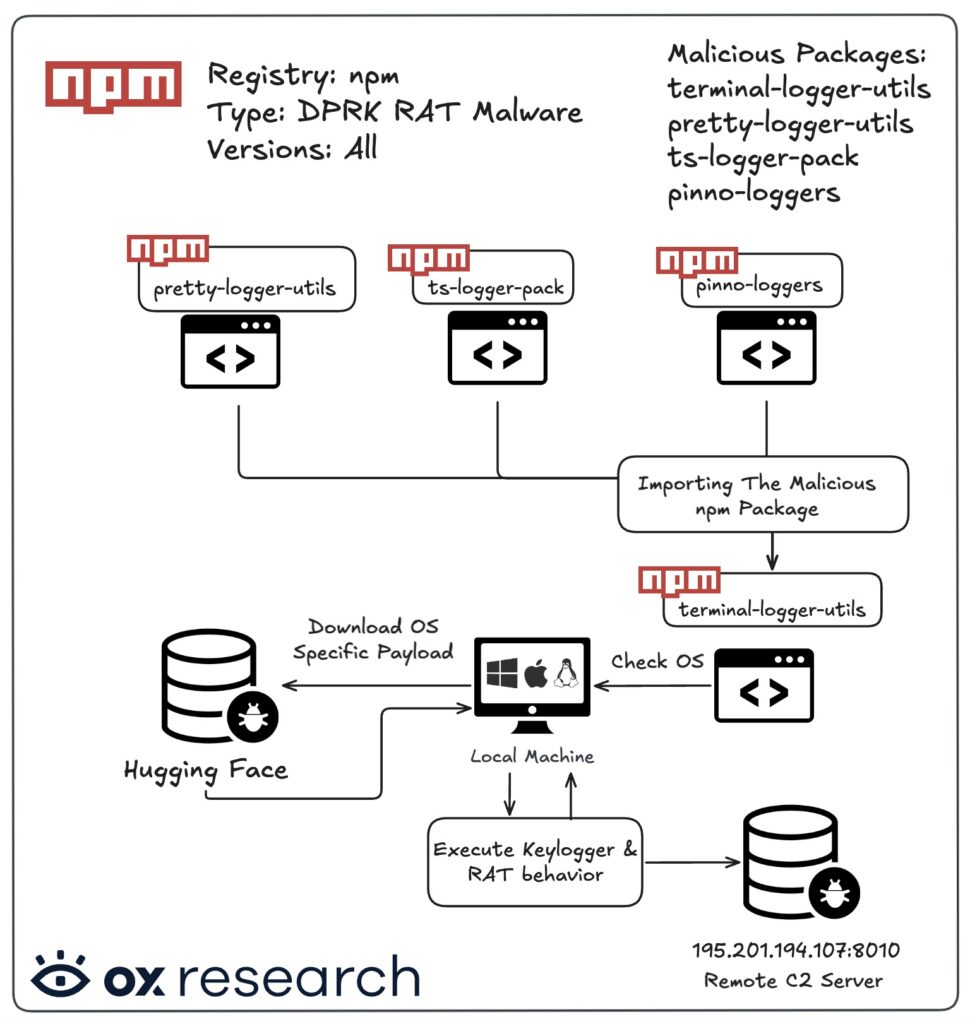
This makes simple package removal insufficient. Any developer who installed the malicious packages should treat the machine as compromised and rotate exposed credentials from a clean system.
- Remove the malicious package and related dependent packages.
- Rebuild affected developer machines from a trusted baseline where possible.
- Rotate npm tokens, GitHub tokens, SSH keys, cloud keys, and CI/CD secrets.
- Check for suspicious scheduled tasks, registry Run keys, and startup scripts.
- Review outbound traffic to known C2 infrastructure and Hugging Face repositories used by the malware.
- Inspect repositories and pipelines for exposed secrets or unauthorized changes.
How developers can reduce npm supply chain risk
Developers should treat unfamiliar install scripts as a serious risk. The npm scripts documentation explains that package scripts can run at defined lifecycle events, which means a malicious package can execute code during installation.
For CI and build systems, teams can use lockfiles and controlled installs. The npm ci documentation also notes that the ignore-scripts option prevents npm from running scripts specified in package.json files.
That option can break packages that need legitimate install scripts, so teams should test it before broad rollout. Still, it gives security teams a practical control for sensitive pipelines where install-time code execution creates unacceptable risk.
| Control | Why it helps |
|---|---|
| Use lockfile-driven installs | Reduces unexpected dependency changes in CI and production builds |
| Review new dependencies | Helps catch typosquatting, fake utilities, and suspicious maintainers |
| Limit install scripts | Reduces the chance of automatic malware execution during npm install |
| Scan for secrets | Finds exposed tokens before attackers use them |
| Segment developer access | Limits damage if one workstation gets compromised |
Indicators of compromise to check
Security teams should look for the malicious npm packages and the Windows persistence path reported in the campaign. They should also review network logs for known command-and-control infrastructure tied to the implant.
JFrog’s analysis shows why private datasets and trusted AI platforms deserve closer monitoring in developer environments. Traffic to legitimate platforms should not receive automatic trust when it involves unknown scripts or suspicious package installs.
SafeDep also warned that the related js-logger-pack activity evolved quickly across multiple versions. That pattern matters because attackers can adjust npm malware rapidly once researchers identify one stage of the campaign.
| Type | Indicator |
|---|---|
| npm package | terminal-logger-utils |
| npm package | pretty-logger-utils |
| npm package | ts-logger-pack |
| npm package | pinno-loggers |
| File | utils.cjs |
| Windows path | %LOCALAPPDATA%\MicrosoftSystem64 |
| Hugging Face repository | Lordplay/system-releases |
| IP address | 195.201.194.107 |
| HTTP endpoint | /api/validate/keyboard-events |
npm attacks are now targeting developer trust
This campaign shows how attackers can combine fake npm utilities, install-time scripts, trusted AI platforms, and secret theft into one chain. The target is not only the developer’s laptop, but also the credentials and access stored on it.
Organizations should respond as if affected systems may have leaked tokens, keys, and cloud credentials. Removing the package helps, but credential rotation and endpoint review matter just as much.
Teams that depend on npm should review dependency intake, package maintainer trust, install-script policy, and CI isolation. The npm ci workflow can help keep builds more predictable, but it should sit inside a broader software supply chain security program.
FAQ
The main malicious package was terminal-logger-utils. Related packages named pretty-logger-utils, ts-logger-pack, and pinno-loggers also imported it and helped trigger the malicious behavior.
The malware used Hugging Face to host second-stage payloads and, in some related activity, store stolen data in private datasets. This helped the traffic blend into normal AI and developer activity.
The malware targeted Telegram data, browser login databases, SSH keys, cryptocurrency wallets, cloud configuration files, environment variables, and other developer secrets.
Developers should remove the packages, isolate the machine, check for persistence, rotate tokens and keys from a clean system, review CI/CD secrets, and inspect accounts for unauthorized access.
Yes. npm supports the ignore-scripts option, which prevents scripts from package.json files from running during install commands. Teams should test this first because some legitimate packages rely on install scripts.


Read our disclosure page to find out how can you help VPNCentral sustain the editorial team Read more


Improve this guide




User forum
0 messages