
How to Fix Helldivers 2 Not Working With VPN (Easy Guide)


 6 min. read
  Published on
Key notes
🛠️ Before diving into the detailed fixes, try these simple pre-checks:
- Ensure your game is fully updated to the latest version.
- Restart your device and router to refresh the network connection.
- Test your internet speed and stability to rule out connectivity issues.
- Disable any background apps that might interfere with network performance.
- Confirm that Helldivers 2 servers are online and not undergoing maintenance.
Find more detailed solutions for Helldrivers 2 not working with VPN below. ⬇️
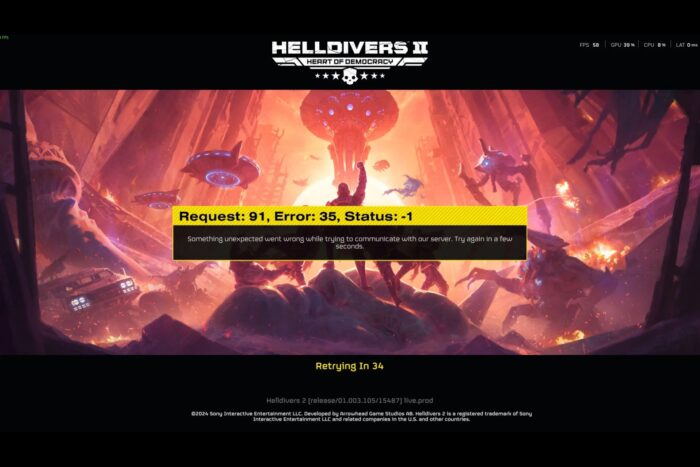
Helldivers 2 is a cooperative third-person shooter that has captivated players with its tactical gameplay, dynamic co-op missions, and engaging universe.
While the game is available on multiple platforms, some players have turned to VPNs to bypass regional restrictions.

Access content across the globe at the highest speed rate.
🔥 Save 81% + 2 bonus months! 🔥
70% of our readers choose Private Internet Access
70% of our readers choose Private Internet Access
2
Browse the web from multiple devices with industry-standard security protocols.
🔥 Save 73%! 🔥

Faster dedicated servers for specific actions (currently discounted)
🔥 Save 69%! 🔥
Unfortunately, using a VPN can sometimes lead to connection issues, errors, or even account risks. This guide explains why VPN problems occur, how to fix them, and what you should know about safely using VPNs with Helldivers 2.
Table of contents
- Why VPNs Sometimes Don’t Work With Helldivers 2
- Common Error Messages When VPN Isn’t Working
- How to Fix VPN Not Working (Step-by-Step Instructions)
- Does Sony Block VPN?
- Risks of Using VPN With Helldivers 2
- Where Is Helldivers 2 Blocked?
- Best Practices for Using VPN With Helldivers 2
- What Platforms Is Helldivers 2 Available On?
- Helldivers 2 Into the Unjust Update
- Conclusion
Why VPNs Sometimes Don’t Work With Helldivers 2
When using a VPN with Helldivers 2, players often encounter the following issues:
- Failed to join game – Unable to connect to multiplayer lobbies. This is similar to issues reported with other multiplayer games not working with VPN.
- Connection timed out – VPN may increase latency, causing timeouts.
- Matchmaking errors – The game detects mismatched IP regions.
- Blocked or restricted access – Some regions are outright restricted, even with a VPN. For a broader list, see geo-restricted games.
These issues are typically caused by the game’s region-locking measures, network latency introduced by VPNs, or VPNs using IPs that have been blacklisted.
Common Error Messages When VPN Isn’t Working
When attempting to play Helldivers 2 with a VPN, players may encounter several error messages, including:
- “Failed to connect to the update server”: This error often occurs due to VPN interference with the game’s connection to its servers.
- “Request: 91, Error: 35, Status: -1”: This indicates a network-related issue, possibly caused by VPN routing conflicts.
- “Unable to establish a connection to game”: This can happen if the VPN’s IP address is flagged or if there’s a mismatch between the game’s region settings and the VPN’s location.
- “Server at capacity”: Using a VPN can sometimes cause the game to misinterpret the player’s location, leading to server overloads or regional restrictions.
How to Fix VPN Not Working (Step-by-Step Instructions)
1. Choose a High-Quality VPN Service
Why: Free or low-quality VPNs often have slow servers or IPs already blocked by game servers.
How to do it:
- Pick reputable VPNs like NordVPN, ExpressVPN, or Surfshark.
- Ensure the VPN provider offers fast servers close to the game server’s region to reduce latency. NordVPN is also highly recommended in guides like New World Game VPN for its stability and gaming performance.
- Subscribe and install the VPN app on your PC or console-compatible device.
2. Connect to the Correct Region
Why: Helldivers 2 may only allow connections from certain countries.
How to do it:
- Open your VPN and select a server in a country where Helldivers 2 is officially available.
- Avoid regions that are permanently blocked (Belarus, Cuba, Iran, Japan, North Korea, Russia, Syria, Vietnam).
- Confirm your IP has changed using a service like whatismyipaddress.com.
3. Use a Wired Connection When Possible
Why: VPNs can introduce latency or instability; a wired connection reduces packet loss and lag.
How to do it:
- Connect your PC or console directly to your router with an Ethernet cable.
- Disable Wi-Fi temporarily to ensure stable throughput.
4. Clear DNS and Cache
Why: Old DNS data can interfere with VPN routing and cause connection errors.
How to do it:
- On PC, open Command Prompt and run
ipconfig /flushdns. - Restart your console or PC after clearing the cache.
5. Check VPN Protocol Settings
Why: Some protocols like OpenVPN TCP may be slower or blocked, whereas WireGuard or UDP can be faster.
How to do it:
- Open your VPN app settings.
- Switch to a protocol optimized for gaming (usually WireGuard or UDP).
- Reconnect and test Helldivers 2. This is similar to solutions used for League of Legends not working with VPN.
6. Temporarily Disable Firewalls or Security Software
Why: Firewalls may block VPN traffic or specific game ports.
How to do it:
- Temporarily disable Windows Firewall or third-party security software.
- Launch Helldivers 2 and test the connection.
- Re-enable security software immediately after testing.
7. Try a Different VPN
Why: Sometimes your current VPN provider may have blocked IPs or slow servers that prevent Helldivers 2 from connecting properly. Switching to a high-quality, reliable VPN like NordVPN can resolve these issues because it has a large network of fast servers optimized for gaming and strong privacy protections.
How to do it:
- Subscribe to NordVPN and install the app.
- Choose a server in a region where Helldivers 2 is available.
- Test the game connection to see if issues are resolved. Guides for VPN not working with Xbox or Epic Games VPN not working offer similar recommendations.
Does Sony Block VPN?
Sony does not universally block VPNs, but Helldivers 2 has measures to detect mismatched regions. Using a VPN to bypass regional restrictions can trigger errors or temporarily prevent multiplayer access. Sony may also limit server access or block IPs that appear suspicious.
Risks of Using VPN With Helldivers 2
- Account Penalties: Violating the game’s terms of service could result in account suspension or bans.
- Connection Issues: VPNs can increase latency, cause matchmaking errors, or lead to disconnections.
- Security Risks: Using unreliable VPNs may expose your data to third parties.
Where Is Helldivers 2 Blocked?
Helldivers 2 remains blocked in the following regions due to legal or regulatory reasons:
- Belarus
- Cuba
- Iran
- Japan
- North Korea
- Russia
- Syria
- Vietnam
Most other countries have access, so VPN use is generally unnecessary outside these areas.
Best Practices for Using VPN With Helldivers 2
- Only use VPNs if your region is blocked.
- Choose a reputable VPN provider with fast servers.
- Connect to servers in countries where the game is available.
- Avoid free VPNs that may be unreliable or already blacklisted.
- Monitor latency and performance; prioritize wired connections.
- Stay informed on the game’s official announcements regarding region locks.
What Platforms Is Helldivers 2 Available On?
- PlayStation 5: Available since February 8, 2024.
- Windows (Steam): Also released February 8, 2024.
- Xbox Series X/S: Released August 26, 2025.
Helldivers 2 Into the Unjust Update
The “Into the Unjust” update (September 2, 2025) introduces significant new content:
- Hive Worlds: Randomly generated subterranean caves with environmental hazards.
- New Terminid Enemies: Includes Rupture Spewer, Rupture Warrior, Rupture Charger, and Dragonroach.
- New Missions: Destroy Spore Lungs, control GATER oil rigs, and extract resources.
- Balancing Adjustments: Unified projectile damage, stun explosion tweaks, and improved Stratagem mechanics.
- Warbond: Dust Devils: New weapons, missile-based Stratagems, and armor sets for customization.
These additions expand the game’s tactical depth and provide fresh challenges for cooperative play.
Conclusion
Using a VPN with Helldivers 2 can be a helpful workaround for regional restrictions, but it comes with challenges and risks. By choosing a reliable VPN, connecting to the correct region, optimizing your connection, and following best practices, players can reduce errors and enjoy the game more smoothly. Always stay informed about region availability, game updates, and official policies to ensure a safe and enjoyable gaming experience.


Read our disclosure page to find out how can you help VPNCentral sustain the editorial team Read more


Improve this guide


User forum
0 messages