
MagicAd Android malware bypasses restrictions to show ads after apps are closed


 6 min. read
  Published on
MagicAd is an Android trojan that can keep showing intrusive ads even after the infected app has been closed. The campaign was detailed by Dr.Web, whose researchers said the malware uses several background launch tricks to bypass Android restrictions that normally stop apps from opening windows on top of other apps.
The malware was hidden in more than 50 games and apps distributed through GetApps, Xiaomi’s official app catalog. Dr.Web also said earlier MagicAd versions appeared in the Samsung Galaxy Store in 2025, which means the campaign was not limited to one marketplace or one device brand.

Access content across the globe at the highest speed rate.
70% of our readers choose Private Internet Access
70% of our readers choose ExpressVPN

Browse the web from multiple devices with industry-standard security protocols.

Faster dedicated servers for specific actions (currently at summer discounts)
At the time of the public report, the infected GetApps listings identified by researchers were no longer available, and the developers behind them had stopped uploading new infected apps. That does not automatically protect users who already installed one of the trojanized apps, because the malicious components can remain active on the device.
How MagicAd reached Android users
The main variant, Android.MagicAd.1, was embedded in ordinary-looking games and utilities, including apps presented as cleaners, file managers, media players, document tools, wallpapers, weather apps, and simple games. Some listings stayed online for only a few weeks before disappearing and being replaced by new ones.
This rotation made the campaign harder to track. It also helped the operators keep infected devices monetized through ad traffic even after individual store listings were removed.
| Area | What researchers found |
|---|---|
| Main distribution channel | More than 50 apps and games in Xiaomi’s GetApps catalog |
| Earlier activity | First MagicAd versions appeared in 2025 and were also seen in the Samsung Galaxy Store |
| Current store status | Identified infected GetApps listings were unavailable when Dr.Web published its report |
| Main purpose | Display ads in the background and generate traffic from infected devices |
How MagicAd shows ads without the normal overlay permission
Android normally limits how apps can launch activities in the background or display themselves over other apps. MagicAd avoids asking for the SYSTEM_ALERT_WINDOW permission and instead loads ads through a Translucent Activity, allowing advertising banners to appear over existing windows.
On Xiaomi devices, MagicAd can send crafted Intents to Mi Browser and MIUI SystemUI. On Amazon TV devices, it can use the Amazon Fire TV Home Screen launcher. The Android.MagicAd.1.origin component handles much of this ad-launching logic after it gets decrypted from the main app.
Vivo devices get a separate path. MagicAd uses Android Binder and targets iManager, Phonebook, Vivo Browser, and Baidu IME Customized to bring its ad component back into action from the background.
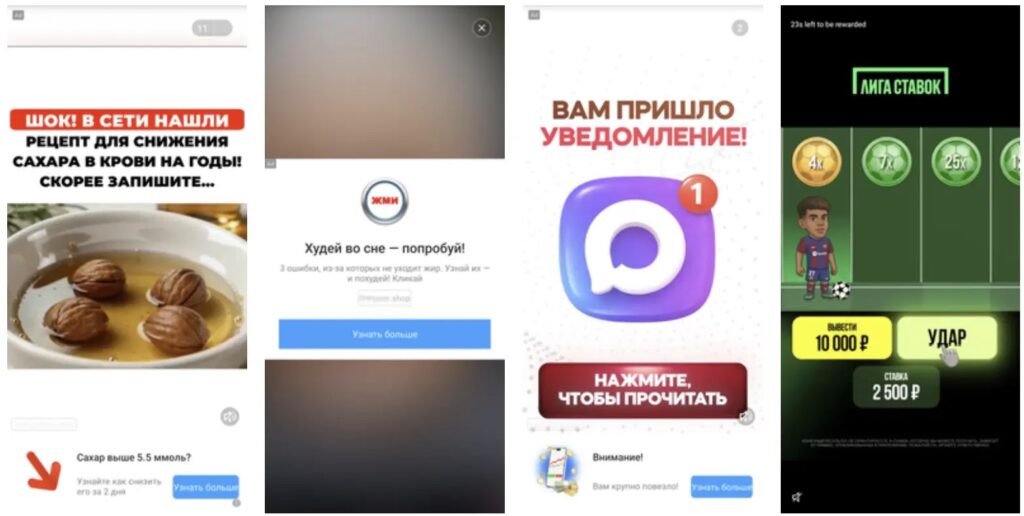
- On Xiaomi, it can use Mi Browser and MIUI SystemUI as trusted launch paths.
- On Amazon Fire TV devices, it can call the Fire TV Home Screen launcher.
- On Vivo, it can use Android Binder to interact with selected system apps.
- On many Android devices, it can abuse the system media player and Android media controls.
The media player trick works across many Android devices
MagicAd also includes a broader method that does not depend on one phone maker. It decrypts an audio file from its own body, saves it locally, launches the system media player at minimum volume, and connects it to Android’s global media control system.
The malware then simulates a media button action with a system command and closes the player window. That action passes control back to MagicAd through a media receiver, which lets the malware launch the ad activity with little visible explanation for the user.
Technical details published in the MagicAd origin component description show that this method applies when certain Android SDK and device conditions are met. This makes the campaign more flexible than adware that relies only on one vendor-specific flaw or permission abuse.
Why infected devices may keep showing ads
MagicAd was built for persistence. The Dr.Web report says the trojan hides its icon from the app menu, creates a notification channel, launches background services, and uses a task scheduler to restart components that support its ad activity.
On older Android versions, MagicAd can also create a tiny virtual screen to help keep a background component from being stopped by the system. If one ad launch method fails, the malware retries before falling back to more direct methods.
The malware also includes anti-analysis checks. Its malware description says MagicAd checks for emulator-like device names, blacklisted IP ranges, advertising identifiers, and whether an install looks organic before it starts displaying ads.
| Indicator type | Example | Why it matters |
|---|---|---|
| Malware name | Android.MagicAd.1 | Main trojan app used to distribute and control ad activity |
| Component name | Android.MagicAd.1.origin | Dex module that launches advertising activities in the background |
| IOC list | Doctor Web indicators of compromise | Includes sample hashes, package names, and app names tied to the campaign |
What Android users should do now
Users who see ads appearing outside normal app use should review recently installed apps, especially games, cleaners, file managers, wallpaper apps, media players, PDF tools, and health-related utilities from alternative or vendor-specific app stores. Removing suspicious apps should be the first step.
Users should also update Android and installed apps, restart the device after removal, and run a scan with a reputable mobile security tool. If an app hides its icon, users may need to review the full installed-apps list in Android settings rather than relying only on the home screen or app drawer.
- Uninstall apps you do not recognize or no longer use.
- Check Android settings for apps that do not appear in the launcher.
- Watch for ads that appear when no browser or free app is open.
- Keep the operating system and security patch level current.
- For managed devices, compare installed package names and hashes against the published IOC list.
MagicAd shows why Android adware can still create serious disruption even when it does not focus on stealing passwords or banking data. The risk comes from persistence, hidden components, background execution, battery drain, and the use of trusted system apps to show ads in ways users do not expect.
FAQ
MagicAd is an Android trojan designed to show ads in the background. It can keep launching advertisements even after the infected app has been closed.
Researchers found MagicAd hidden in more than 50 apps and games listed in Xiaomi’s GetApps catalog. Earlier versions were also seen in the Samsung Galaxy Store in 2025.
Yes. Dr.Web described MagicAd techniques for Xiaomi, Vivo, and Amazon Fire TV devices. It also uses a media player method that can work across many Android device models.
MagicAd avoids asking for the normal overlay permission and loads ads as a Translucent Activity. It can also use trusted system apps, Android Binder, or the system media player to launch ads from the background.
Users should uninstall suspicious apps, review the full installed-apps list in Android settings, update the device, restart it, and run a scan with a trusted mobile security app.


Read our disclosure page to find out how can you help VPNCentral sustain the editorial team Read more


Improve this guide




User forum
0 messages