
Microsoft 365 Connectivity Test Site Shows Browser Warning After Certificate Expiry


 5 min. read
  Published on
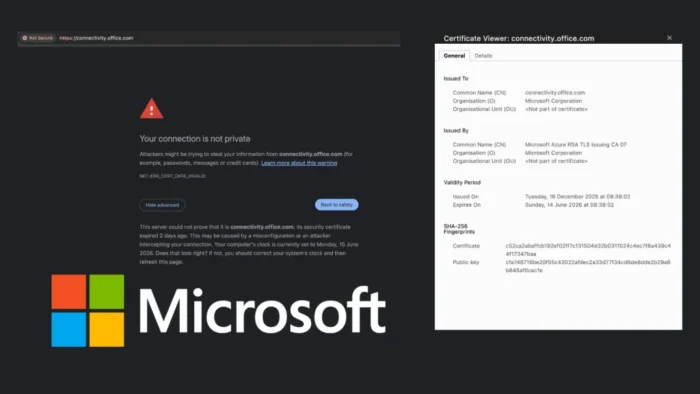
A Microsoft 365 connectivity testing site started showing browser security warnings after its TLS certificate expired. The affected address, connectivity.office.com, is used by administrators and IT teams to test whether a network can reach Microsoft 365 services.
The issue caused Chromium-based browsers to display a NET::ERR_CERT_DATE_INVALID warning when users tried to open the site. The warning means the browser could not confirm that the certificate for the site was still valid.

Access content across the globe at the highest speed rate.
70% of our readers choose Private Internet Access
70% of our readers choose ExpressVPN

Browse the web from multiple devices with industry-standard security protocols.

Faster dedicated servers for specific actions (currently at summer discounts)
The expiry does not mean Microsoft 365 services such as Outlook, Teams, SharePoint, or Exchange Online went down. However, it can disrupt troubleshooting workflows for admins who use the Microsoft 365 network connectivity test tool during onboarding, network checks, or firewall investigations.
What Happened to the Microsoft 365 Connectivity Site
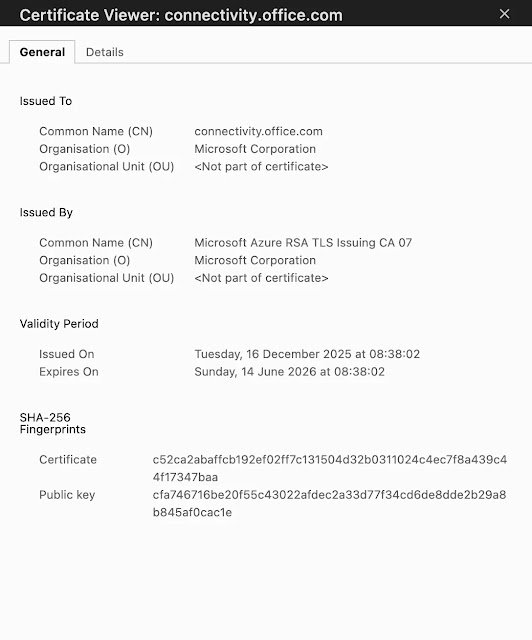
The certificate on connectivity.office.com expired on June 14, 2026, after a 180-day validity period, according to The Register. The same report said the certificate had last been renewed on December 16, 2025.
When a TLS certificate expires, browsers block or warn against the connection because they can no longer trust the certificate chain for that site. That is why admins saw a warning instead of a normal page load.
The Microsoft page itself still identifies the service as a Microsoft 365 network connectivity test. The Microsoft 365 network connectivity test page says it measures connectivity between the user’s device, the internet, and Microsoft’s network.
Why IT Administrators Use This Tool
Microsoft’s current documentation says the global version of the network connectivity test tool is located at connectivity.m365.cloud.microsoft. The tool works alongside network assessment and network insights in the Microsoft 365 admin center, according to the Microsoft Learn documentation.
Admins use the tool to check latency, local network egress, Microsoft 365 service front door proximity, proxy behavior, and blocked connections. It also supports a downloadable Windows client for more detailed testing.
| Item | Details |
|---|---|
| Affected site | connectivity.office.com |
| Error shown | NET::ERR_CERT_DATE_INVALID |
| Reported expiry date | June 14, 2026 |
| Reported previous renewal date | December 16, 2025 |
| Likely impact | Browser warnings and possible failed automated HTTPS checks |
The Practical Impact Appears Limited but Annoying
This certificate lapse should not stop users from accessing Microsoft 365 apps. It affects a diagnostic endpoint, not the main Microsoft 365 service stack.
Still, the timing creates a real problem for IT teams. If an admin tries to investigate a Microsoft 365 network issue and the diagnostic site itself shows a certificate warning, it can slow triage and create confusion.
Automated checks may also fail if they validate certificates strictly. This matters for organizations that include Microsoft 365 connectivity checks in onboarding scripts, monitoring jobs, or help desk playbooks.
What Admins Should Do Now
Admins should avoid bypassing browser warnings unless they fully understand the risk and confirm they are connecting to the expected Microsoft-owned endpoint. A certificate warning always deserves caution, even when the problem appears to be an expired certificate.
- Use Microsoft’s current connectivity test URL from official documentation where possible.
- Check internal scripts that call connectivity.office.com over HTTPS.
- Review monitoring jobs for failed certificate validation checks.
- Warn help desk teams that the browser warning may be related to the expired certificate.
- Use the Microsoft 365 admin center network health tools as an alternative during the disruption.
The Register reported that Microsoft did not provide a response before publication. Given the visibility of the domain, Microsoft is likely to renew or replace the certificate quickly.
Certificate Hygiene Matters More in 2026
The incident stands out because Microsoft has been urging organizations to prepare for a separate certificate lifecycle issue involving Secure Boot. In its Windows Secure Boot certificate guidance, Microsoft says older Secure Boot certificates issued in 2011 begin expiring in June 2026.
Microsoft says devices that do not receive newer 2023 Secure Boot certificates will still start and run, but they will no longer receive some new protections for the early boot process. The company’s Secure Boot certificate update page tells customers to keep devices current so they can continue receiving those protections.
That broader guidance makes the expired connectivity certificate more embarrassing than damaging. Microsoft is asking customers to manage long-term certificate transitions carefully, while one of its own public diagnostic endpoints briefly failed a basic certificate validity check.
| Question | Answer |
|---|---|
| Is this a Microsoft 365 outage? | No. The issue affects a connectivity testing site, not the core Microsoft 365 services. |
| Should users ignore the warning? | No. Admins should treat certificate warnings carefully and use official alternative tools when possible. |
| Can scripts fail because of this? | Yes. Scripts that require a valid HTTPS certificate may fail until the certificate is renewed. |
| Is there a current Microsoft-documented test URL? | Yes. Microsoft documentation points to connectivity.m365.cloud.microsoft as the global test URL. |
FAQ
The Microsoft 365 connectivity testing site at connectivity.office.com showed browser security warnings because its TLS certificate expired. Browsers flagged the page with a NET::ERR_CERT_DATE_INVALID error.
No. The certificate issue affected a diagnostic endpoint used for Microsoft 365 connectivity testing. It did not mean Outlook, Teams, SharePoint, or Exchange Online were down.
NET::ERR_CERT_DATE_INVALID means the browser found a problem with the site certificate date. In this case, reports said the certificate had expired, so the browser could not fully trust the connection.
Admins should avoid bypassing the warning unless they have confirmed the endpoint and understand the risk. They should use Microsoft’s current documented connectivity test URL or Microsoft 365 admin center network health tools while the certificate issue is being resolved.
The issue is notable because the affected site is used by IT teams for Microsoft 365 network diagnostics. It also happened while Microsoft has been warning customers to prepare for other certificate lifecycle changes, including Secure Boot certificate updates in 2026.


Read our disclosure page to find out how can you help VPNCentral sustain the editorial team Read more


Improve this guide




User forum
0 messages