
Microsoft 365 Device Code Phishing Campaign Uses Real Login Flow to Take Over Accounts


 7 min. read
  Published on

A Microsoft 365 phishing campaign is using device code authentication to take over accounts without directly stealing passwords. Instead of sending users to a fake password page, attackers trick them into completing a real Microsoft sign-in flow that authorizes an attacker-controlled device.
ReversingLabs said it found an active campaign that abuses Microsoft’s OAuth 2.0 Device Authorization Grant flow, according to its device code phishing report. The technique is dangerous because the Microsoft login page itself is legitimate, which makes the attack harder for users to recognize.

Access content across the globe at the highest speed rate.
70% of our readers choose Private Internet Access
70% of our readers choose ExpressVPN

Browse the web from multiple devices with industry-standard security protocols.

Faster dedicated servers for specific actions (currently at summer discounts)
Microsoft has previously warned that device code phishing can give attackers access to cloud accounts through legitimate authentication infrastructure. In one earlier case, Microsoft Security described campaigns that used document access, electronic signing, and voicemail lures to push users toward device login prompts.
How Device Code Phishing Works
Device code authentication has legitimate uses. Microsoft designed it for devices where entering a password is difficult, such as smart TVs, shared devices, command-line tools, and some IoT systems.
In this campaign, attackers abuse that flow. A victim receives a business-themed email, such as a vendor approval or document request. The message includes an attachment or linked image that opens a phishing landing page.
The landing page asks the victim to copy a short code and enter it on a real Microsoft device login page. Once the victim signs in and submits the code, the attacker’s device becomes authorized to access the Microsoft 365 account.
| Step | What the victim sees | What the attacker gains |
|---|---|---|
| Email lure | A business request, document review, approval, or file-sharing prompt | A click from the target |
| Landing page | A polished page asking the user to copy a code | Control over the authentication setup |
| Real Microsoft login | A legitimate Microsoft device login page | User approval for the attacker-controlled device |
| Token access | No obvious password theft warning | Access and refresh tokens for Microsoft 365 services |
Why This Attack Can Bypass Password Theft Defenses
The campaign does not need to capture a password through a fake login form. It persuades the victim to complete a real authentication process, then uses the resulting token to access services such as Outlook, Teams, OneDrive, and SharePoint.
The FBI’s Internet Crime Complaint Center recently warned about similar Microsoft 365 token theft through device code phishing. Its Kali365 advisory said attackers can use OAuth access and refresh tokens to maintain access without needing the victim’s password or another MFA challenge.
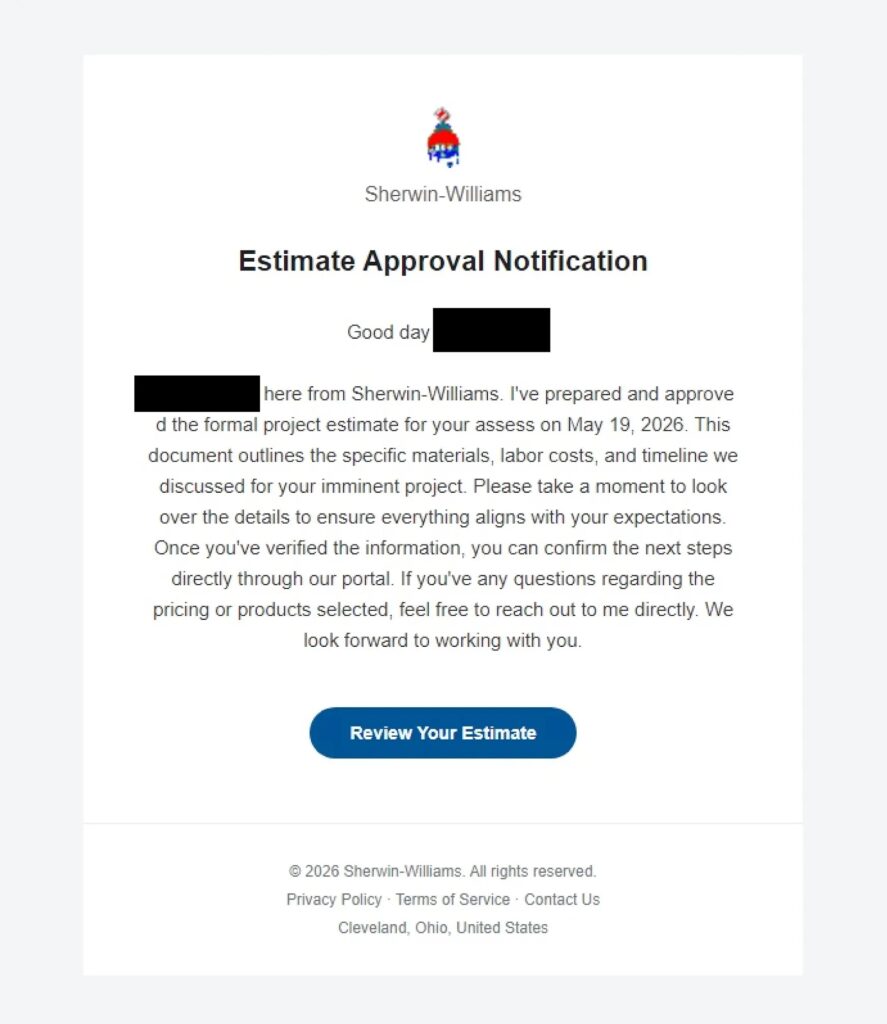
This is why ordinary MFA awareness is not enough. A user may think they are safely signing in on a Microsoft page, but the code they entered connects the session to a device controlled by the attacker.
The Phishing Kit Uses Evasion Tricks
ReversingLabs found that the phishing kit hides suspicious words in landing page code with invisible Unicode characters, including Zero Width Space, Word Joiner, and Zero Width Non-Joiner. These characters can break simple keyword-based detection while leaving the page readable to victims.
The kit also opens the legitimate aka.ms device login entry point used by Microsoft. The ReversingLabs analysis said the device code is sent back to the phishing kit host in a POST request every four seconds to coordinate the authentication flow.
Network defenders can look for suspicious clusters of traffic involving the phishing page, aka.ms, login.microsoftonline.com, aadcdn.msftauth.net, and login.live.com, especially when they appear alongside repeated beaconing to a phishing host.
Microsoft Says Device Code Flow Is High Risk
Microsoft describes device code flow as a higher-risk authentication method because attackers can use it in phishing or to access corporate resources from unmanaged devices. The company’s authentication flows documentation says organizations should allow device code flow only where it is necessary.
Microsoft also recommends using Conditional Access to control device code flow. In its policy guidance, Microsoft says organizations should get as close as possible to a unilateral block on device code flow, after auditing legitimate use.

That advice matters because device code flow is useful in some environments, but many organizations do not need it broadly enabled for all users and all cloud apps.
How Security Teams Can Reduce the Risk
- Audit Microsoft Entra ID sign-in logs for device code flow usage.
- Identify legitimate business cases before blocking or restricting the flow.
- Create a Conditional Access policy that blocks device code flow for most users.
- Exclude emergency access accounts carefully to avoid administrator lockout.
- Train users to question any email that asks them to copy a code into a Microsoft login page.
- Monitor for repeated POST requests to suspicious phishing hosts during authentication.
- Review access tokens and revoke sessions for any suspected compromised accounts.
The Microsoft Conditional Access guidance recommends first testing policies in report-only mode, then moving enforcement to active blocking after confirming the impact.
The IC3 warning also recommends restricting device code flow, auditing current use, and blocking authentication transfer where it is not needed.
What Users Should Watch For
Users should treat any unexpected prompt to copy and paste a code into a Microsoft login page as suspicious. This is especially true when the request comes from an email attachment, document-sharing message, invoice, approval request, or voicemail notification.
A real Microsoft login page does not always mean the request is safe. The key warning sign is the context. If the user did not start a device login on a device they control, they should not enter the code.
Microsoft’s Entra ID documentation notes that sign-in logs can help organizations understand where device code flow is used. That visibility gives admins a practical way to separate normal use from suspicious account takeover attempts.
The campaign shows how attackers continue to move away from basic password theft and toward token-based account access. For Microsoft 365 tenants, the safest response is to restrict device code flow wherever possible and monitor closely where it must remain enabled.
The broader pattern also matches earlier warnings from Microsoft Security, which found attackers using trusted cloud infrastructure and legitimate login pages to make phishing harder to spot.
FAQ
Microsoft 365 device code phishing is an attack where a victim is tricked into entering a code on a real Microsoft login page. The code authorizes an attacker-controlled device, which can give the attacker access to the victim’s Microsoft 365 account without directly stealing the password.
Device code phishing can bypass the protection users expect from MFA because the victim completes a legitimate Microsoft authentication process. Once the attacker receives valid access and refresh tokens, they may access Microsoft 365 services without knowing the password.
Depending on permissions and token scope, attackers may access Microsoft 365 services such as Outlook, Teams, OneDrive, and SharePoint. They may also use the compromised account for internal phishing or lateral movement.
Admins can review Microsoft Entra ID sign-in logs for device code flow usage, investigate unfamiliar devices and locations, and hunt for suspicious traffic patterns involving device login pages, Microsoft authentication endpoints, and repeated beaconing to phishing hosts.
Organizations that do not need device code flow should block it with Microsoft Entra Conditional Access. If they need it for specific devices or workflows, they should restrict it to documented use cases and monitor it closely.


Read our disclosure page to find out how can you help VPNCentral sustain the editorial team Read more


Improve this guide




User forum
0 messages