
Microsoft Defender can now automatically isolate compromised devices during active attacks


 7 min. read
  Published on
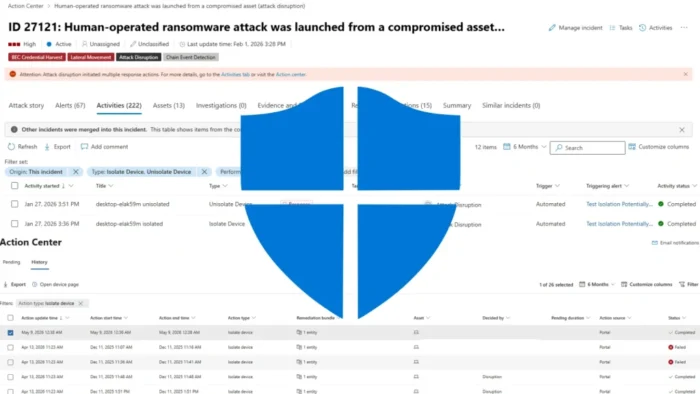
Microsoft Defender for Endpoint can now automatically isolate compromised devices when Microsoft Defender XDR detects a high-confidence active attack. The feature is designed to stop ransomware propagation, lateral movement, and data exfiltration before analysts manually intervene.
The new capability appears in Microsoft’s Defender for Endpoint feature update as a May 2026 preview feature. Microsoft says isolation blocks most network traffic while keeping the device connected to security services.

Access content across the globe at the highest speed rate.
70% of our readers choose Private Internet Access
70% of our readers choose ExpressVPN

Browse the web from multiple devices with industry-standard security protocols.

Faster dedicated servers for specific actions (currently at summer discounts)
This means security teams can still receive telemetry and investigate the machine after isolation begins. The device loses normal network access, but it does not disappear from Defender’s monitoring pipeline.
How automatic isolation works
Automatic device isolation is part of Microsoft Defender XDR automatic attack disruption. Instead of responding to a single alert, Defender XDR correlates signals across endpoints, identities, email, collaboration tools, SaaS apps, files, and other sources to understand the full incident.
When the system determines that a device is being used as an active foothold, it can isolate that device from the network. Microsoft says this helps contain attacks while giving security teams more time to investigate and remediate.
The action is incident-scoped. Defender does not isolate an entire environment just because one affected device appears in an attack chain.
| Feature | What it does |
|---|---|
| Automatic device isolation | Disconnects compromised workstations from most network traffic |
| Defender connectivity | Keeps the isolated device connected to Microsoft Defender for Endpoint |
| Incident-level action | Targets devices involved in a high-confidence attack |
| Operator control | Allows security teams to review and release isolation |
| Preview status | Listed as a preview feature in May 2026 |
The feature targets fast-moving attacks
Ransomware crews often move quickly after gaining a foothold. They try to spread laterally, access privileged systems, disable defenses, exfiltrate data, and encrypt files before defenders can fully respond.
Microsoft’s ransomware response playbook advises isolating compromised devices from the network while keeping them powered on for investigation. Automatic isolation brings that response step closer to real time when Defender XDR has enough confidence.
The biggest advantage is speed. Instead of waiting for an analyst to review every signal, Defender can cut off the attacker’s network access while the incident is still unfolding.
- Blocks most network traffic from the compromised workstation.
- Limits attacker command-and-control access.
- Reduces lateral movement opportunities.
- Helps prevent ransomware from spreading to nearby systems.
- Keeps the device visible to Defender for Endpoint.
- Allows analysts to release the device after investigation.
What devices are in scope
The feature does not apply to every machine in an organization. Microsoft’s device response documentation says automatic device isolation works only on end-user workstations that are onboarded and managed by Microsoft Defender for Endpoint.
That limitation matters for security teams planning rollout. Servers, unmanaged devices, and systems outside Defender for Endpoint management do not fall under the current automatic isolation scope.
Organizations still need separate response procedures for servers, critical infrastructure, unmanaged assets, network appliances, and cloud workloads.
| Device type | Automatic isolation status |
|---|---|
| Managed end-user workstations | In scope when onboarded to Defender for Endpoint |
| Unmanaged devices | Outside the current feature scope |
| Servers | Not covered by this automatic device isolation scope |
| Critical business systems | May need exclusions or selective isolation planning |
Microsoft added safeguards for business disruption
Automatic isolation can affect business operations, so Microsoft built several controls around the feature. The action targets specific devices involved in the incident, rather than broadly cutting off network access across the organization.
The same device response documentation says automatic isolation is time-limited and can be released earlier by security operators after investigation and remediation.
Microsoft also supports exclusions. Security teams can define devices or entities that should be excluded from automatic disruption actions, and they can configure selective isolation rules for specific processes and network destinations.
Where analysts can review isolation actions
Security teams can review automatic isolation activity in the Microsoft Defender portal. The incident Activities tab shows automated response actions connected to the incident, and Action center provides action history and current status.
Microsoft’s Defender XDR update page also notes that automatic attack disruption can now isolate compromised devices when high-confidence incident analysis shows a device is being used as an active foothold.
That visibility is important because automated response actions need audit trails. Analysts must know when isolation occurred, why it happened, which device was affected, and whether the action completed successfully.
| Portal area | What analysts can check |
|---|---|
| Incident Activities tab | Automatic disruption and isolation activity linked to an incident |
| Device page | Current isolation status for the affected device |
| Action center | History, status, source, and outcome of response actions |
| Incident context | Alerts, assets, users, and related evidence behind the action |
Why this changes ransomware response
Traditional ransomware response often depends on an analyst spotting the right alert, validating the device, and manually isolating it. That workflow can take too long during a fast-moving intrusion.
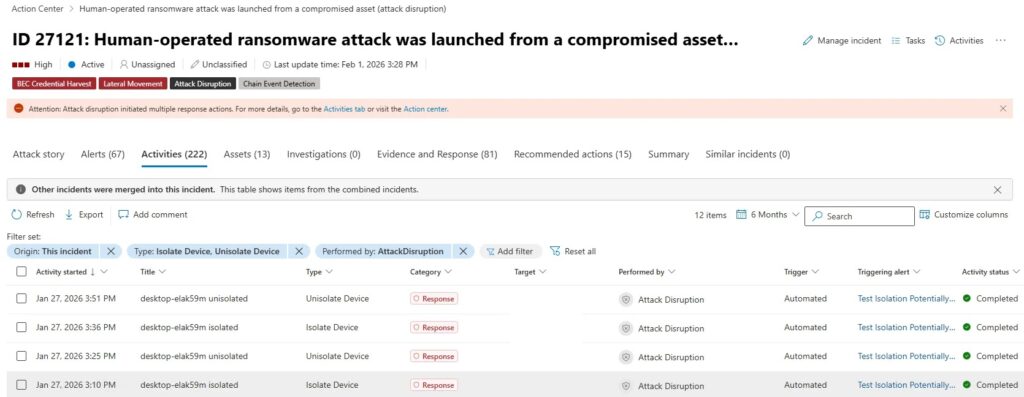
Automatic attack disruption shifts the containment step earlier. Microsoft says automatic attack disruption works at the incident level and uses high-fidelity signals to identify compromised assets that attackers are using to spread the attack.
This does not remove the security team from the process. It gives analysts a contained device to investigate instead of an active foothold still talking to the rest of the network.
What organizations should do now
Security teams should first confirm that workstations are onboarded to Microsoft Defender for Endpoint and reporting correctly. Automatic isolation can only help if Defender can see and manage the device.
Organizations should then review automatic attack disruption settings, exclusion rules, and incident response procedures. Business-critical workstations may need careful planning so containment does not interrupt essential operations without oversight.
The Defender XDR update page describes the action as time-limited, scoped to devices involved in the incident, and releasable by security operators at any time.
- Confirm workstations are onboarded to Defender for Endpoint.
- Review automatic attack disruption configuration.
- Identify devices that may need automatic disruption exclusions.
- Define who can release a device from isolation.
- Test investigation workflows in the Defender portal.
- Update ransomware playbooks to include automatic isolation events.
How to release an isolated device
After remediation, analysts can release a device from isolation through the device page in the Microsoft Defender portal. Microsoft says operators should release isolation only after they confirm appropriate containment and remediation steps are complete.
This fits Microsoft’s ransomware response playbook, which recommends isolating compromised systems without shutting them off. Keeping systems online helps preserve evidence and allows investigators to collect data.
Security teams should document who approved the release, what remediation occurred, and whether credentials, persistence, malware, or lateral movement artifacts were found during investigation.
Bottom line
Microsoft Defender for Endpoint’s automatic device isolation gives organizations a faster way to contain compromised workstations during active attacks. It can cut off attacker movement while keeping the device visible to Defender for Endpoint.
The feature should help during ransomware and intrusion scenarios, but it is not a replacement for security operations. Teams still need onboarding coverage, tested response procedures, exclusions for sensitive systems, and clear rules for releasing devices from isolation.
For organizations already using Defender XDR and Defender for Endpoint, the feature adds an important containment layer at the moment when speed matters most.
FAQ
Automatic device isolation is a Defender for Endpoint preview feature that can disconnect a compromised workstation from most network traffic when Defender XDR identifies it as part of a high-confidence active attack.
Yes. Microsoft says the device keeps connectivity to the Defender for Endpoint service after isolation, which allows the platform to continue monitoring the device while normal network access is restricted.
Microsoft says automatic device isolation currently works only on end-user workstations that are onboarded and managed by Microsoft Defender for Endpoint. Servers and unmanaged devices are outside this feature’s current scope.
Yes. Security operators can release an isolated device from the Microsoft Defender portal after completing investigation and remediation. Microsoft also says the isolation action is time-limited.
Ransomware attacks often depend on speed, lateral movement, and access to other systems. Automatic isolation can cut off a compromised workstation earlier, limiting the attacker’s ability to spread or exfiltrate data.


Read our disclosure page to find out how can you help VPNCentral sustain the editorial team Read more


Improve this guide




User forum
0 messages