
Microsoft Fixes Outlook Bug That Removed Copilot Button for Windows Users


 8 min. read
  Published on
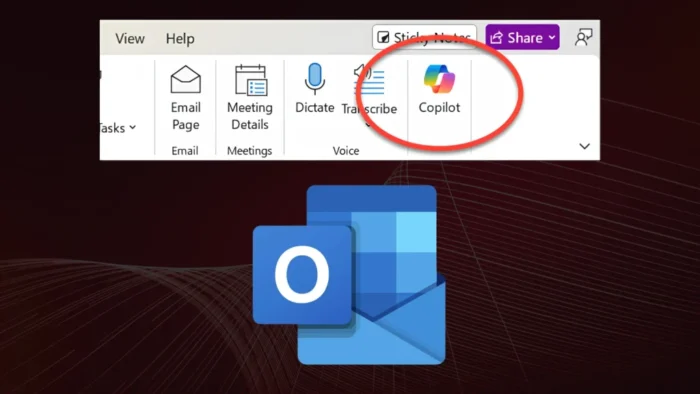
Microsoft has fixed a classic Outlook for Windows bug that caused Copilot Chat and Copilot buttons to disappear for some users with the Copilot Chat Basic license.
The issue appeared after classic Outlook updated to build 20026.20182 and later. Microsoft confirmed the problem on its classic Outlook known issue page and said the Outlook Team resolved it through a service-side change on June 29, 2026.

Access content across the globe at the highest speed rate.
70% of our readers choose Private Internet Access
70% of our readers choose ExpressVPN

Browse the web from multiple devices with industry-standard security protocols.

Faster dedicated servers for specific actions (currently at summer discounts)
The bug did not affect users with the paid Microsoft 365 Copilot Premium license. It mainly disrupted users who had access to Copilot Chat Basic and expected the feature to remain available inside classic Outlook.
What Happened in Classic Outlook
Microsoft said affected users could no longer see Copilot Chat or Copilot entry points in classic Outlook for Windows. The missing buttons made the issue look like a license problem, even though other Copilot access points still worked.
BleepingComputer reported that the bug removed the Copilot button from the top-right area above the ribbon and also hid the Copilot icon from the left app bar or More Apps area.
In some cases, users could still see Copilot listed under Add Apps, but clicking Open did nothing. Adding Copilot through ribbon customization could also show the command as unavailable or grayed out.
Who Was Affected?
| User group | Impact | Status |
|---|---|---|
| Classic Outlook for Windows users on build 20026.20182 and later | Copilot Chat and Copilot entry points could disappear | Fixed by Microsoft |
| Users with Copilot Chat Basic | Affected by the missing button issue | Restart Outlook and update Office if needed |
| Users with M365 Copilot Premium | Not affected by this known issue | No action needed for this specific bug |
| Outlook on the web users | Copilot remained available through other entry points | Could be used as a workaround |
Microsoft’s broader guide on missing Copilot buttons says users should confirm they are signed in with the correct licensed account. For this Outlook bug, however, the known issue was tied to a specific client build and license tier.
The problem was not a full Copilot outage. Copilot remained available from other places, including Outlook on the web and the Microsoft 365 Copilot standalone app or web experience.
How Microsoft Fixed the Issue
Microsoft said the Outlook Team fixed the issue with a service change on June 29, 2026. Because the fix came from the service side, affected users did not need to wait for a separate full client patch in every case.
Users who still cannot see the button should restart classic Outlook. Microsoft also recommends updating Office by going to File, Office Account, Update Options, and then Update Now.
The Microsoft support page lists the issue as fixed and gives the update steps for users who do not see the change immediately.
Temporary Workarounds Microsoft Listed
Before the fix reached users, Microsoft listed several workarounds for organizations that needed Copilot access immediately. These workarounds still help explain what admins can do if a similar feature-visibility problem appears again.
- Use new Outlook while classic Outlook is affected.
- Use Outlook Web Access, also known as OWA.
- Revert Current Channel to build 16.0.20026.20168.
- Temporarily disable Office automatic updates after reverting.
- Re-enable updates after Microsoft confirms the fix has reached users.
Admins who revert a build should treat that step as temporary. Running older Office builds for too long can leave users without the latest fixes and reliability improvements.
Why the Bug Looked Like a Licensing Problem
The issue affected Copilot Chat Basic users but not users with Microsoft 365 Copilot Premium. That made the outage look like a licensing or entitlement validation problem inside classic Outlook.
Microsoft’s Copilot licensing documentation explains that Copilot Chat is available to eligible organizations, while work-based chat capabilities depend on Microsoft 365 Copilot licensing. This layered model can make troubleshooting harder when only one app or license tier breaks.
For admins, the key detail is that a missing Copilot button does not always mean a user lost their license. It can also point to an Outlook build issue, a service-side change, a privacy setting, or an update-channel limitation.
What Users Should Check First
| Check | Why it matters |
|---|---|
| Restart classic Outlook | Microsoft says this can pick up the service-side fix |
| Install the latest Office build | Outdated builds may not receive the corrected behavior |
| Confirm the signed-in account | Copilot features depend on the licensed account in Microsoft 365 apps |
| Check update channel | Semi-Annual Enterprise Channel may not support some Copilot features |
| Review privacy settings | Connected experiences and content analysis settings can affect Copilot availability |
The general Microsoft guide for enabling a missing Copilot button also tells users to refresh their license and make sure the right account is active in Microsoft 365 apps.
Business users should also ask their IT team to check tenant settings. Some Copilot features depend on connected experiences, privacy controls, admin policies, and supported Microsoft 365 update channels.
Copilot Still Worked in Other Outlook Entry Points
The bug mainly affected classic Outlook for Windows. Microsoft said Copilot remained available through Outlook on the web and the Microsoft 365 Copilot standalone app or web experience.
Microsoft’s Copilot in Outlook FAQ says Copilot features can help summarize email threads, draft messages, coach writing, chat about work information, and support some scheduling tasks.
That explains why the missing button disrupted users even though it did not stop all Copilot access. Many users rely on the desktop Outlook interface as their main email workspace throughout the day.
Why IT Teams Should Track Known Issues
For organizations, the incident shows why Copilot support tickets should not start and end with license checks. A feature can disappear because of a known app issue even when the user has the expected entitlement.
BleepingComputer noted that affected users could use new Outlook or Outlook Web Access while waiting for the fix. That gave organizations a short-term way to keep Copilot available for impacted staff.
Admins should check Microsoft’s known-issue pages before assuming malware interference, tenant misconfiguration, or a license removal. That can reduce unnecessary troubleshooting and keep users on safer supported builds.
Recommended Admin Response
- Identify users running classic Outlook build 20026.20182 or later.
- Confirm whether affected accounts have Copilot Chat Basic rather than M365 Copilot Premium.
- Ask users to restart Outlook after the June 29 service-side fix.
- Push the latest Office update through normal management tools.
- Offer Outlook on the web or new Outlook if the classic client still fails.
- Avoid long-term build rollback unless Microsoft support recommends it.
Microsoft’s Copilot Chat overview says Copilot Chat is an AI prompt-and-response experience for work and can be used without a Microsoft 365 Copilot license in eligible scenarios.
The separate Microsoft 365 Copilot licensing page gives admins more detail on which subscriptions include Copilot Chat and which capabilities require a Microsoft 365 Copilot license.
What This Means for Outlook Users
The Outlook Copilot button issue was a reliability bug, not a security vulnerability. Microsoft fixed it through a service-side change, and affected users should restart Outlook and update Office if the button has not returned.
The incident still matters because it affected a visible AI feature inside one of Microsoft’s most widely used desktop apps. As Microsoft adds more Copilot entry points across Microsoft 365, license validation and feature rollout logic need to remain predictable.
The Outlook Copilot FAQ shows how many places Copilot now appears inside Outlook. The Microsoft Copilot Chat overview also shows why a small button issue can affect daily workflows when users rely on Copilot as part of their email routine.
FAQ
Microsoft said the issue appeared after classic Outlook for Windows updated to build 20026.20182 and later. It affected users with the Copilot Chat Basic license and removed Copilot Chat or Copilot entry points from the classic Outlook interface.
Yes. Microsoft says the Outlook Team fixed the issue with a service-side change on June 29, 2026. Users who still do not see Copilot should restart Outlook and install the latest Office update.
The issue affected classic Outlook for Windows users with the Copilot Chat Basic license. Microsoft says it did not affect users with the paid Microsoft 365 Copilot Premium license.
Restart classic Outlook, then update Office through File, Office Account, Update Options, and Update Now. Also confirm that you are signed in with the correct licensed account and that your organization allows the required connected experiences.
Yes. Microsoft said Copilot remained available through other entry points, including Outlook on the web and the Microsoft 365 Copilot standalone app or web experience.


Read our disclosure page to find out how can you help VPNCentral sustain the editorial team Read more


Improve this guide




User forum
0 messages