
Nearly 14,000 SimpleHelp Servers Exposed After Critical Authentication Bypass Disclosure


 6 min. read
  Published on
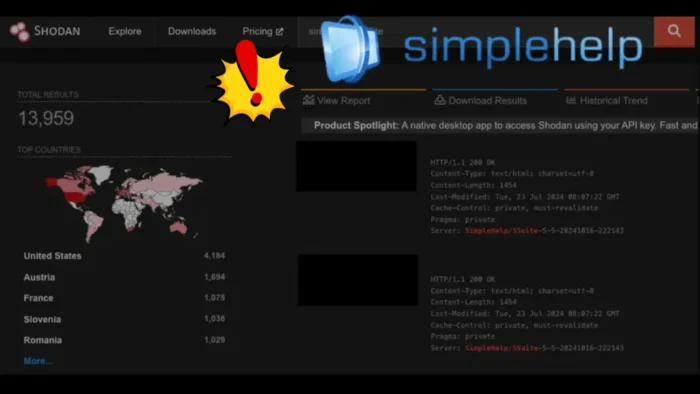
Nearly 14,000 internet-facing SimpleHelp servers are exposed online after researchers disclosed a critical authentication bypass vulnerability in the remote support and RMM platform.
The flaw, tracked as CVE-2026-48558, affects SimpleHelp versions 5.5.15 and earlier, as well as 6.0 pre-release versions before the fixed release. In vulnerable configurations, an unauthenticated attacker can forge an OpenID Connect identity token and obtain a fully authenticated technician session.

Access content across the globe at the highest speed rate.
70% of our readers choose Private Internet Access
70% of our readers choose ExpressVPN

Browse the web from multiple devices with industry-standard security protocols.

Faster dedicated servers for specific actions (currently at summer discounts)
Horizon3.ai said the issue applies to SimpleHelp deployments that use OIDC authentication, including enterprise identity provider setups such as Azure Active Directory. The company estimated that roughly 7.2% of exposed SimpleHelp servers it sampled were configured in a way that made them vulnerable.
Why CVE-2026-48558 Is Dangerous
SimpleHelp is used by IT teams, help desks, and managed service providers for remote support, unattended access, monitoring, scripting, and device management. The SimpleHelp platform can connect technicians to managed endpoints, which makes any server-side authentication bypass a high-impact issue.
The vulnerability exists in the OIDC authentication flow. According to the CVE record, SimpleHelp accepts identity tokens during login without properly verifying their cryptographic signature when OIDC authentication is configured.
That can allow a remote attacker to submit a forged token with arbitrary identity claims. If the server is configured with the required OIDC group settings, the attacker can create or access a technician account without knowing a valid password.
| Item | Details |
|---|---|
| CVE | CVE-2026-48558 |
| Product | SimpleHelp Remote Support and RMM software |
| Severity | Critical, CVSS 10.0 |
| Bug type | OIDC authentication bypass |
| Affected versions | SimpleHelp 5.5.15 and earlier, plus affected 6.0 pre-release builds |
| Fixed versions | SimpleHelp 5.5.16 and SimpleHelp 6.0 RC2 |
Only Some Exposed Servers Are Directly Vulnerable
The headline exposure number is large, but not every exposed SimpleHelp server can be exploited through this bug. Horizon3.ai said SimpleHelp exposure grew from roughly 3,400 internet-facing servers in early 2025 to nearly 14,000 in June 2026.
However, the vulnerability requires specific OIDC settings. The exact conditions include at least one OIDC provider configured, at least one TechnicianGroup associated with that provider, and group-authenticated logins enabled for that TechnicianGroup.
The Horizon3.ai analysis said a random sample suggested about 7.2% of exposed systems used the vulnerable OIDC configuration. That still leaves a meaningful number of servers at risk because SimpleHelp can provide remote access to many managed endpoints behind each server.
MFA May Not Stop the Attack
Multi-factor authentication does not fully protect affected SimpleHelp deployments in this scenario. Researchers said the bypass can allow attackers to self-register their own MFA method during first login as a newly created or forged technician identity.
That matters because technician accounts can perform powerful actions. Depending on the deployment, a technician may be able to access managed machines, run scripts, use remote support features, and make configuration changes.
A BleepingComputer report also warned that the flaw can let unauthenticated attackers create privileged remote support accounts on SimpleHelp servers using OIDC authentication.
- Attackers do not need a valid SimpleHelp password in vulnerable OIDC configurations.
- The forged login can create a technician session.
- Technician access may allow remote control of managed endpoints.
- MFA may be bypassed if the attacker can register a new method during first login.
- Compromise of one SimpleHelp server can create downstream risk for many connected systems.
SimpleHelp Has Released Security Updates
The official SimpleHelp security update says action is required for servers running SimpleHelp 5.5.x and affected 6.0 pre-release versions. The vendor recommends updating to SimpleHelp 5.5.16 or SimpleHelp 6.0 RC2.
The company said servers running SimpleHelp 5.5.15 and earlier may be vulnerable depending on server settings and network context. It also noted that not all servers can be exploited, but still urged customers to update to a secure release as soon as possible.
The SimpleHelp release notes list SimpleHelp 5.5.16 as a security release that closes a critical vulnerability. The same release also adds controls around technician account login uniqueness and Entra ID or OIDC account linking.
| SimpleHelp branch | Vulnerable versions | Fixed version |
|---|---|---|
| 5.5.x | 5.5.15 and earlier | 5.5.16 |
| 6.0 pre-release | Pre-release versions before the fix | 6.0 RC2 |
How Administrators Can Check for Compromise
Administrators should first check the SimpleHelp technician list for unfamiliar names, unknown email addresses, or unexpected group-authenticated users. Horizon3.ai says administrators can view these accounts from the SimpleHelp interface by enabling the option to show group-authenticated users under the Technicians section.
Server logs can also show signs of suspicious technician registration or configuration changes. On Linux hosts, SimpleHelp logs may be stored under /opt/SimpleHelp/logs/server.log and timestamped subdirectories under /opt/SimpleHelp/logs/.
The BleepingComputer coverage noted that administrators should look for unfamiliar technician accounts and unexpected server log entries after the disclosure.
- Update SimpleHelp to 5.5.16 or 6.0 RC2.
- Review all technician accounts for unfamiliar names or email addresses.
- Enable the view that shows group-authenticated technician users.
- Inspect SimpleHelp server logs for unexpected technician registrations.
- Check for configuration changes made by unknown technician identities.
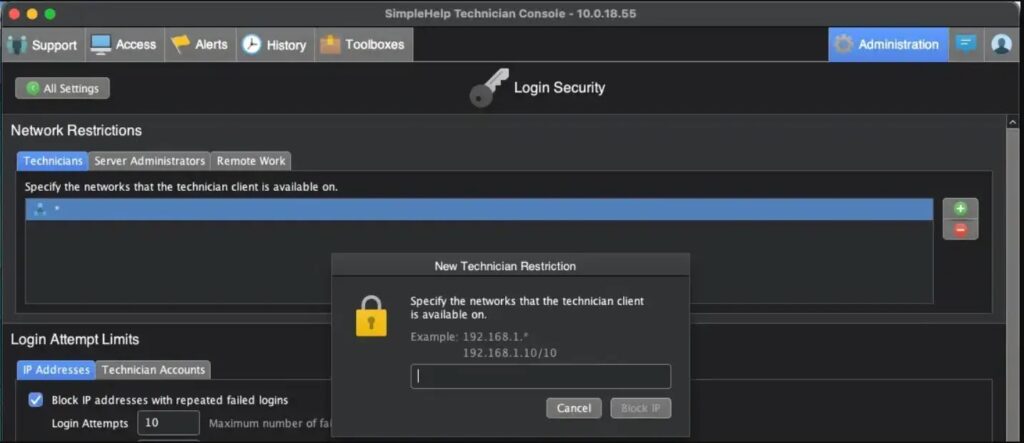
- Restrict technician login access to trusted IP ranges where possible.
- Review connected endpoints if any suspicious technician activity appears.
Temporary Mitigations if Patching Is Delayed
Patching remains the main fix. If administrators cannot update immediately, Horizon3.ai recommends applying IP restrictions to limit where technicians can authenticate from inside the SimpleHelp Login Security settings.
Admins should also review OIDC provider settings, TechnicianGroup mappings, and group-authenticated login settings. Disabling unnecessary OIDC login paths can reduce risk until the update window opens.
The SimpleHelp notice says customers who already applied the vendor’s recommended security guide measures face a more difficult exploitation path, but the company still tells users to update to a secure release as soon as possible.
RMM Tools Remain High-Value Targets
Remote support and RMM platforms remain attractive targets because they provide centralized access to many machines. A successful compromise can give attackers a trusted route into endpoints that would otherwise sit behind firewalls or VPNs.
The remote support software category gives technicians powerful tools for support, scripting, monitoring, and unattended access. Those same features raise the stakes when an attacker gains technician privileges.
The latest SimpleHelp update adds security improvements around technician login handling, but customers still need to audit their own environments. Updating stops the known authentication bypass, while log review helps determine whether a rogue technician account was created before the fix.
FAQ
CVE-2026-48558 is a critical authentication bypass vulnerability in SimpleHelp’s OIDC login flow. In vulnerable configurations, an unauthenticated attacker can forge identity claims and obtain a fully authenticated technician session.
No. Horizon3.ai found nearly 14,000 internet-facing SimpleHelp servers, but a sampled review suggested that about 7.2% used the vulnerable OIDC configuration. That means the directly vulnerable number is much smaller than the total exposed-server count.
SimpleHelp 5.5.16 fixes the issue for the 5.5.x branch, while SimpleHelp 6.0 RC2 fixes the issue for affected 6.0 pre-release deployments.
MFA may not stop the attack in vulnerable configurations because an attacker can register a new MFA method during first login as a forged or newly created technician identity.
Administrators should update to SimpleHelp 5.5.16 or 6.0 RC2, review technician accounts for unfamiliar users, inspect SimpleHelp server logs, restrict technician logins by trusted IP ranges, and investigate connected endpoints if suspicious technician activity appears.


Read our disclosure page to find out how can you help VPNCentral sustain the editorial team Read more


Improve this guide




User forum
0 messages