
New Phishing Attack Abuses Outlook and Microsoft 365 Groups to Target Users


 8 min. read
  Published on
A new phishing technique is abusing Outlook Groups and Microsoft 365 collaboration features to make malicious activity look like normal workplace communication. Instead of sending only a suspicious email, attackers place the lure inside trusted workflows such as group invitations, shared files, group mailboxes, and calendar reminders.
The technique was documented by Fortra Intelligence and Research Experts, which said the attack shifts phishing away from a single message and into a familiar Microsoft 365 experience. The risk begins when a user accepts an invite, opens a shared file, clicks a link, downloads content, signs in, or replies to the attacker.

Access content across the globe at the highest speed rate.
70% of our readers choose Private Internet Access
70% of our readers choose ExpressVPN

Browse the web from multiple devices with industry-standard security protocols.

Faster dedicated servers for specific actions (currently at summer discounts)
The attack does not rely on a flaw in Microsoft 365 itself. It abuses normal collaboration behavior. Microsoft says Microsoft 365 Groups give members access to shared resources such as an Outlook inbox, shared calendar, Planner, and shared files, which explains why attackers can use one group to reach several user-facing surfaces at once.
How the Outlook Groups phishing attack works
The attack usually starts when a threat actor creates or controls a Microsoft 365 group. The group may use a name that sounds routine, such as IT Support, HR Updates, Finance Review, Leadership Briefing, Payroll Notice, or All Company.
The attacker then adds or invites the target, where external collaboration settings allow it. The first notification can look clean because it arrives through a legitimate Microsoft 365 workflow rather than through a poorly spoofed email domain.
Once the user sees the group as familiar or work-related, the attacker can send follow-up content through the group mailbox, shared files, or Outlook calendar invites. This makes the phishing path feel like an ordinary internal task rather than a suspicious one-time message.
| Attack stage | What the user sees | Possible risk |
|---|---|---|
| Group invite | A welcome message from a familiar-looking Microsoft 365 group | User trusts the context and ignores warning signs |
| Group mailbox | A follow-up message about payroll, IT, HR, invoices, or training | Credential theft or social engineering |
| Shared file | A document, QR code, support form, or download instruction | Malware delivery, token theft, or fake login pages |
| Calendar invite | A meeting or deadline that keeps sending reminders | Repeated pressure to click or respond |
Why Microsoft 365 Groups make the attack convincing
Microsoft 365 Groups exist to make collaboration simple. That same convenience can help attackers if organizations allow external users or loosely governed group creation.
A single group can create multiple touchpoints across Outlook, calendar, files, and shared conversations. A phishing message sent through those channels may look more credible than a direct message from an unknown address.
Microsoft’s guest access settings let administrators control whether people outside an organization can access group resources or whether group owners can add external users. These settings become important when attackers try to use group membership as the first step in a phishing chain.
CalPhishing turns calendar reminders into pressure
One important part of the campaign is calendar phishing, also called CalPhishing. In this method, the attacker uses an Outlook calendar invite or .ics file to keep the lure visible after the original email is missed, ignored, deleted, or quarantined.
The calendar event can appear as a project meeting, HR deadline, invoice review, admin alert, account review, or security task. The user may ignore the first notification but later see a reminder and treat it like an unfinished work item.
This repeated exposure makes the attack more persistent than a normal phishing email. The hook moves from the inbox into the calendar, where reminders can continue nudging the user toward a link, document, or reply.
- Attackers can use urgent group names to make the invite feel internal.
- Shared files can host fake support steps, QR codes, or credential pages.
- Calendar reminders can keep the phish active after email cleanup.
- Security tools may miss the full chain if they only inspect the first email.
- Users may trust the message because it appears inside Microsoft 365.
What defenders should monitor
Fortra says defenders should investigate the full workflow, not only the original email. A clean group notification may still lead to a malicious file, calendar event, or follow-up message.
Security teams should review who created the group, who owns it, who was added, whether external members exist, what messages were sent, what files were shared, and whether calendar entries remain after mail remediation.
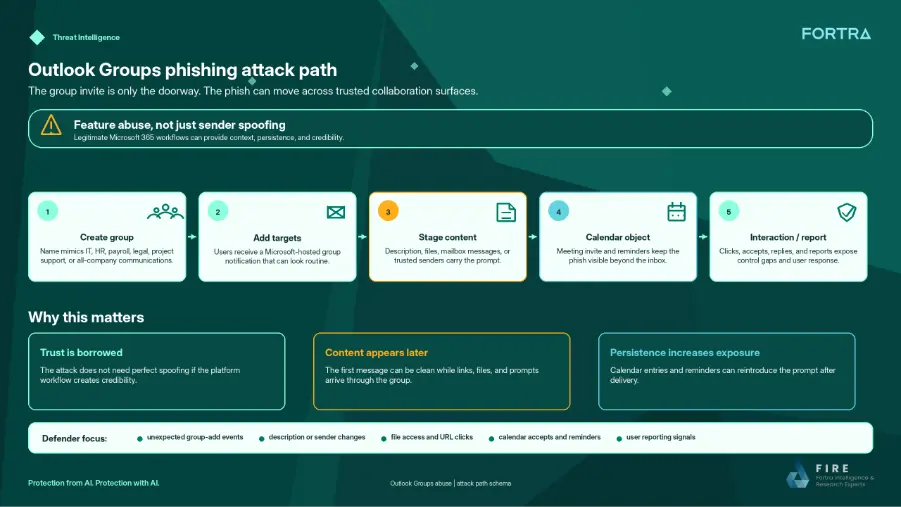
The Fortra report also notes that organizations can block group notifications from groups.outlook.com when they have a clear inbound, internal, and outbound mail flow that supports such a rule.
| Detection area | What to check | Why it matters |
|---|---|---|
| Group creation | New groups with names such as IT Support, HR Updates, or Finance Review | Attackers may use familiar names to create trust |
| Membership changes | Unexpected additions of internal users or external guests | Victims may be pulled into attacker-controlled workspaces |
| Shared files | New files containing QR codes, login links, macros, or support instructions | Payloads may sit outside the original email |
| Calendar entries | Events with urgent tasks, links, or suspicious attachments | CalPhishing can remain after email remediation |
| External collaboration | Guest access and group-owner permissions | Weak settings can increase exposure |
How Microsoft 365 admins can reduce the risk
Administrators should review group creation policies and decide whether all users need the ability to create Microsoft 365 Groups. They should also restrict external collaboration where business needs do not require it.
Microsoft’s Microsoft 365 Groups guest access guidance explains how admins can allow or block external users from accessing group resources. Tightening these settings can reduce the chance that an attacker-controlled group reaches employees through trusted Microsoft 365 surfaces.
Organizations should also use training that reflects modern phishing behavior. Microsoft’s Attack simulation training helps organizations test security policies and train employees against phishing scenarios in Microsoft 365 environments.
Security teams need cross-surface visibility
Email review alone may not catch this technique. The first message can look legitimate, while the real risk appears later in a shared document, a calendar invite, or a follow-up group message.
Security tools should correlate signals across Exchange, Outlook calendar, SharePoint or OneDrive files, group membership, Entra ID activity, and user reports. This gives defenders a clearer view of the full attack path.
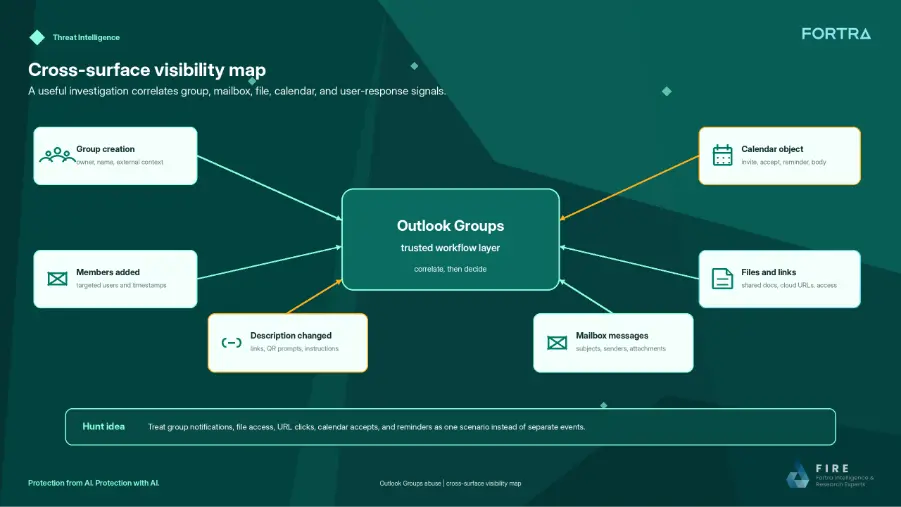
The Microsoft 365 Groups overview shows why this visibility matters: group membership automatically gives users access to shared resources. Attackers abuse that trust model by turning normal collaboration into a delivery path.
- Limit group creation to users who need it.
- Review external guest access for groups.
- Monitor new groups with sensitive or urgent names.
- Inspect shared files linked from group messages.
- Search for calendar invites that contain links, QR codes, or unusual instructions.
- Train users to report unexpected group additions and meeting invites.
- Test defenses with safe simulations that include groups, files, and calendar events.
Why this phishing method matters
The campaign shows how phishing is moving deeper into the tools employees use every day. Attackers no longer need to perfectly spoof Microsoft when they can make the lure appear inside Microsoft 365 itself.
That makes user awareness and administrative controls equally important. Employees should treat unexpected group invites, shared files, and meeting reminders with the same caution as suspicious emails.
Admins should validate their defenses through Microsoft attack simulation training and by testing whether their security stack can see the entire chain from group invitation to calendar reminder. The organizations that can connect those signals quickly will have a better chance of stopping trusted-workflow phishing before it becomes an account compromise.
FAQ
It is a phishing technique that abuses Outlook Groups and Microsoft 365 Groups to make malicious activity look like normal collaboration. Attackers use group invitations, shared files, group mailboxes, and calendar invites to push users toward credential theft, token capture, malware, or social engineering.
No. Fortra describes it as abuse of legitimate Microsoft 365 collaboration features, not a software vulnerability. The risk comes from attackers using trusted workflows to make phishing content appear routine.
CalPhishing, or calendar phishing, uses Outlook calendar invites and reminders to keep a phishing lure visible after the original email is missed, deleted, or remediated. The invite may look like a meeting, deadline, admin alert, or invoice review.
Microsoft 365 Groups can provide a shared inbox, calendar, files, and other collaboration resources. Attackers can abuse those trusted surfaces to make phishing content look like normal workplace activity.
Admins should review new group creation, unexpected member additions, external guests, group mailbox messages, shared files, calendar events, and links or QR codes delivered through Microsoft 365 collaboration surfaces.
Organizations can restrict group creation, tighten external guest access, monitor group and calendar activity, inspect shared files, train users to report unexpected invites, and simulate trusted-workflow phishing scenarios safely.


Read our disclosure page to find out how can you help VPNCentral sustain the editorial team Read more


Improve this guide




User forum
0 messages