
Opera Adds Paste Protect to Block Clipboard Attacks and ClickFix Lures


 8 min. read
  Published on
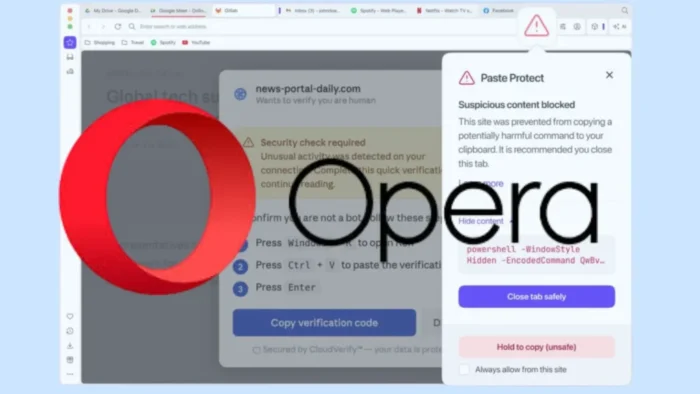
Opera has launched Paste Protect, a built-in browser security feature that blocks clipboard-based attacks, including ClickFix-style tricks that push users into pasting malicious commands into a terminal.
The feature is now available in Opera’s desktop browsers and is enabled by default. According to Opera’s announcement, Paste Protect combines existing clipboard hijack protection with a new Injection Protection system built to stop dangerous commands before they reach the clipboard.

Access content across the globe at the highest speed rate.
70% of our readers choose Private Internet Access
70% of our readers choose ExpressVPN

Browse the web from multiple devices with industry-standard security protocols.

Faster dedicated servers for specific actions (currently at summer discounts)
The move targets a fast-growing social engineering technique. In ClickFix attacks, fake website warnings tell users to copy and paste a command to fix a browser, CAPTCHA, video, or system issue. That command can install malware, steal credentials, or give attackers remote access.
What Paste Protect Does
Paste Protect checks clipboard activity inside Opera and warns users when a website tries to copy suspicious content. If Opera detects a harmful command, it blocks the copy action and shows a warning before the user can paste it into a terminal.
The browser also shows a red warning icon in the address bar. Opera says users can review a preview of the blocked content, while advanced users can override the block when they trust the source.
The feature works across Windows, macOS, and Linux using detection methods designed for each platform. Opera said the goal is to stop clipboard abuse at the point where many ClickFix attacks normally succeed.
How ClickFix Attacks Work
A ClickFix attack usually starts with a fake message on a website. The page may claim that a CAPTCHA failed, a video cannot play, a browser update is needed, or a system check found an error.
The victim is then asked to copy a command and paste it into a terminal, PowerShell, Run box, or command-line window. The page frames this as a normal troubleshooting step, but the copied command runs attacker-controlled code.
The Huntress 2026 Cyber Threat Report said ClickFix accounted for 53% of malware loader activity in 2025. Huntress said attackers used routine-looking tasks, including fake CAPTCHA flows, to trick users into installing infostealers, ransomware, and remote access tools.
Paste Protect Components
| Component | What it protects against | Example risk |
|---|---|---|
| Hijack Protection | Unauthorized changes to clipboard content | A copied crypto wallet address or bank account number gets replaced |
| Injection Protection | Malicious commands copied by a website or user action | A ClickFix page tries to place a harmful terminal command on the clipboard |
| Warning popup | User confusion during risky copy actions | The browser explains that Opera blocked suspicious copied content |
| Site allowlist | False positives on trusted developer websites | A developer allows a trusted site where copying scripts is expected |
Opera’s security blog says Paste Protect can identify when websites try to replace copied content or place harmful commands on the clipboard. The Opera security explanation also says the feature warns users before dangerous content can be executed.
That matters because clipboard attacks often abuse normal user behavior. The user performs the final action, which can make the attack harder for older security tools to block.
Why Browser-Level Protection Matters
Traditional security tools can detect many malicious files, scripts, and network connections. ClickFix attacks try to avoid those controls by making the user copy and run the command manually.
Help Net Security reported that Opera’s new feature blocks suspicious clipboard activity before the copied command reaches the user’s system terminal. That places the browser directly in the attack chain.
The clipboard itself is also a known target for attackers. MITRE ATT&CK tracks clipboard data collection as a technique because attackers may monitor or abuse copied content to steal sensitive information.
What Happens When Opera Blocks a Command
When Paste Protect detects suspicious content, Opera blocks the browser from copying it to the clipboard. It then shows a warning popup and marks the page with a red security indicator in the address bar.
Users can inspect a shortened preview of the blocked content. Opera says advanced users can use a “Hold to Copy” option when they understand the risk, and they can allow trusted websites where copying scripts is part of normal work.
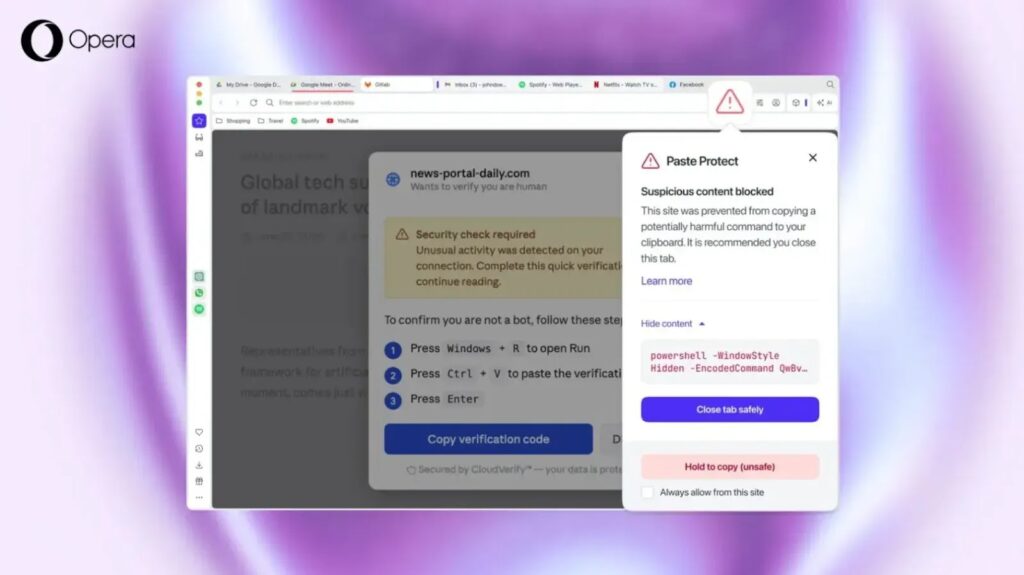
Paste Protect can be managed in Settings, under Privacy & Security and then Paste Protect. The feature is enabled by default, so users do not need to install an extension or configure the browser first.
How Paste Protect Changes the ClickFix Attack Chain
| Attack step | Without protection | With Paste Protect |
|---|---|---|
| Fake warning appears | User sees a fake CAPTCHA, browser error, or video issue | The page can still appear, but the copy action is monitored |
| Command is copied | Malicious command reaches the clipboard | Opera checks the content for suspicious patterns |
| User opens terminal | User may paste and execute the command | Opera blocks the copy and warns the user first |
| Malware runs | Infostealer, RAT, or loader may execute | The attack can stop before execution |
Opera says Paste Protect includes detection tailored to Windows, macOS, and Linux. That gives the browser a better chance of identifying commands that look dangerous on each operating system.
The browser will not remove the need for user caution. It can stop suspicious copy actions, but users should still avoid running terminal commands from random websites, popups, ads, or unsolicited support pages.
ClickFix Became a Major Malware Delivery Method
The rise of ClickFix shows how attackers keep shifting away from obvious malicious attachments. They now rely more heavily on social engineering that makes the victim perform the risky step.
The Huntress report said ClickFix and its variants turned users into unwitting accomplices by disguising malicious actions as routine tasks. This helped attackers deliver malware without needing to break into the system first.
Opera is responding to that shift by putting protection in the browser rather than waiting for the operating system, antivirus engine, or endpoint tool to catch the command after execution.
What Users Should Do
- Keep Opera updated so Paste Protect and other security features remain current.
- Do not copy terminal, PowerShell, or Run commands from unfamiliar websites.
- Close pages that ask you to fix a CAPTCHA, video, or browser error through a command line.
- Read Paste Protect warnings before using any override option.
- Allowlist only websites you trust and understand, such as known developer platforms.
- Report suspicious pages to your IT or security team if you use a work device.
The Opera security post also reminds users that no system catches every attack. Users remain the final line of defense when a website asks them to copy and run commands.
What Organizations Should Watch
Businesses should treat ClickFix as a user-driven malware delivery risk, not just a browser annoyance. Attackers can use these lures to install infostealers, remote access tools, and ransomware loaders.
Security teams should monitor for suspicious process chains that begin after browser activity. Common warning signs include browsers launching command-line tools, PowerShell, script interpreters, remote access utilities, or unexpected installers.
MITRE ATT&CK lists clipboard data as a target because copied content can include credentials, commands, wallet addresses, and other sensitive values. That makes clipboard visibility useful for detection, but it also creates privacy and monitoring considerations for enterprise tools.
Why the Feature Stands Out
Opera says Paste Protect is built directly into the browser and is switched on automatically. That gives users protection without needing to search for a third-party extension.
Help Net Security described the launch as a response to clipboard hijacking and pastejacking, including the newer ClickFix pattern. The feature focuses on stopping the copy step before the user can execute the command elsewhere.
Opera said Paste Protect gives the browser one of the most complete clipboard defenses among major browsers. The larger takeaway is that browser makers are now moving closer to user-action-based threat prevention, where attackers exploit trust rather than software bugs.
FAQ
Opera Paste Protect is a built-in browser security feature that detects and blocks suspicious clipboard activity, including attempts to copy malicious commands used in ClickFix attacks.
Yes. Opera says Paste Protect is enabled by default in its desktop browsers, so users receive protection without installing an extension or changing settings.
A ClickFix attack is a social engineering technique where a fake website message tells users to copy and run a command to fix a CAPTCHA, browser, video, or system issue. The command can install malware or give attackers access.
Yes. Opera says advanced users can use a Hold to Copy option and can allow trusted websites where copying commands or scripts is expected.
No. Paste Protect adds browser-level protection against clipboard attacks, but users and organizations should still use layered security, endpoint protection, browser updates, and safe browsing habits.


Read our disclosure page to find out how can you help VPNCentral sustain the editorial team Read more


Improve this guide




User forum
0 messages