
Ousaban Malware Uses Phishing PDFs and VBS Downloader to Target Banking Users in Spain and Portugal


 9 min. read
  Published on
Ousaban is targeting Windows users in Spain and Portugal with phishing PDFs that lead to a VBS downloader, hidden payloads, and banking credential theft. The campaign focuses on Iberian banking users and uses geofencing to avoid infecting people outside the intended region.
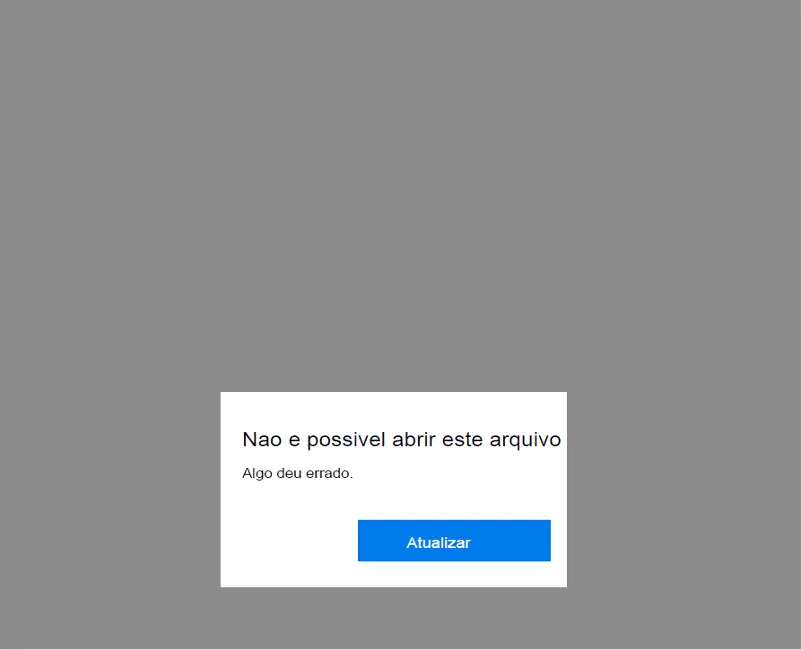
The attack begins with a fake PDF that claims the file is corrupted. The document asks the user to click an “Atualizar” button, which means “Update” in Portuguese, and then sends the victim to a malicious page disguised as a tax or document service.

Access content across the globe at the highest speed rate.
70% of our readers choose Private Internet Access
70% of our readers choose ExpressVPN

Browse the web from multiple devices with industry-standard security protocols.

Faster dedicated servers for specific actions (currently at summer discounts)
FortiGuard Labs identified the campaign in May 2026 and published its analysis on July 1, 2026. The company rated the threat as high severity because stolen banking data can support fraud and follow-up attacks.
Ousaban Campaign Targets Iberian Banking Users
Ousaban is not a new malware family. It has long been known as a Latin American banking trojan, and earlier research from ESET described it as a Delphi-based threat that uses overlay windows to steal credentials from financial services.
The latest campaign changes the delivery method and the target region. Instead of focusing only on Brazil, the new activity aims at users in Spain and Portugal and screens visitors before it delivers the malicious VBS file.
This selective delivery helps the operators avoid sandboxes, researchers, and automated crawlers. Anyone outside the expected location may see only an access-denied message or a harmless-looking page.
How the Phishing PDF Starts the Infection
The lure uses a PDF made to look broken. It shows a message that pushes the user to update or open the file through a button, while hidden JavaScript inside the document can also trigger the same malicious page.
The webpage checks the visitor’s IP address, browser language, time zone, and other environment details. Fortinet also found checks designed to block VPN users and detect automated analysis environments.
After the victim passes the check, the page downloads a VBS file. That script contains many harmless-looking functions, but its real job is to retrieve the next payload stage and install Ousaban on the Windows device.
Attack Chain at a Glance
| Stage | What happens | Why it matters |
|---|---|---|
| Phishing PDF | The victim opens a PDF that claims the file is corrupted. | The lure looks like a normal document problem. |
| Fake update prompt | The PDF asks the user to click “Atualizar.” | The button sends the victim to attacker-controlled infrastructure. |
| Geofencing | The page checks location, language, time zone, and VPN indicators. | The malware reaches users in Spain and Portugal while hiding from many scanners. |
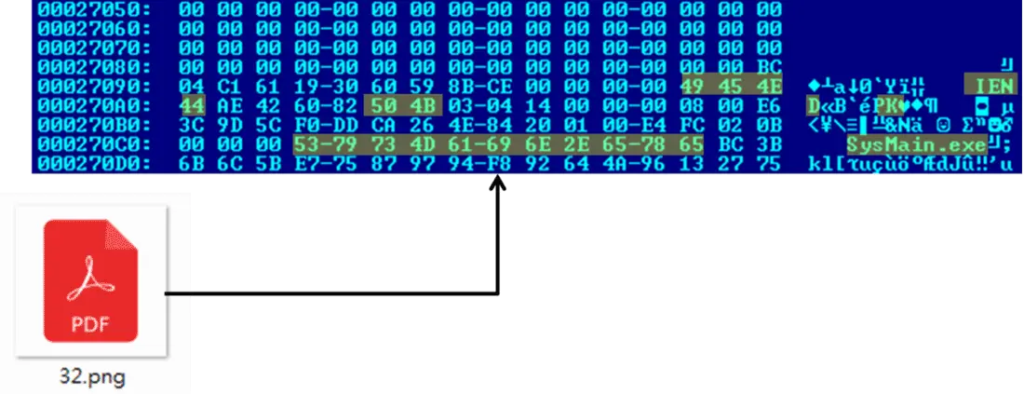
| VBS downloader | A VBS file downloads a steganographic image. | The real payload hides inside a file that resembles a PDF icon. |
| Payload extraction | The script extracts a ZIP archive from the image. | The archive contains the final Ousaban payload. |
| Persistence | Ousaban creates a Run key named Financeiro. | The malware can start again when Windows launches. |
The VBS downloader drops temporary files during the infection process and then deletes the VBS file, ZIP archive, and image file after execution. That cleanup reduces forensic evidence on the device.
The final payload gets placed in C:\SysMain_5874288 before execution. The malware then creates a registry value named Financeiro in the Windows Run key so it can persist across reboots.
Steganography Helps Hide the Payload
One of the campaign’s main evasion tricks involves hiding a ZIP archive inside an image file that resembles a PDF icon. The VBS script extracts the embedded archive and uses it to retrieve the final Ousaban executable.
This approach can reduce detection because security tools may first see what looks like a harmless image rather than a direct executable download. It also gives attackers a way to split the infection chain across several file types.
Ousaban has used varied delivery methods for years. Netskope Threat Labs previously documented Ousaban activity that abused cloud services and used MSI files to download second-stage payloads.
What Ousaban Does After Installation
Ousaban stays focused on banking activity. After installation, it decrypts bank-related strings and waits for the victim to visit targeted financial services through a browser.
The malware can capture screenshots, log keystrokes, control the mouse and keyboard, manipulate the clipboard, and show fake messages or overlays to deceive the victim during a banking session.
Microsoft’s Ousaban malware entry says the threat can perform actions chosen by a malicious actor on the infected device. That makes it more than a simple credential stealer.
Command Infrastructure Changes Daily
The command-and-control setup uses a decoy to mislead investigators. Fortinet found a Pastebin link inside the malware that points to a private IP address, but the malware does not use that post to retrieve the real server.
Instead, Ousaban builds a daily hostname when it detects the victim accessing certain banking services. It combines a hard-coded string with the current date, generates an MD5 hash, and uses part of that hash to form a changing subdomain.
This daily rotation makes static blocking less effective. A domain that helped identify the malware yesterday may not work the next day, so defenders need behavior-based detection as well as indicators of compromise.
Why This Campaign Is Harder to Analyze
The newest version moves much of the screening logic to the attacker’s server. Earlier versions included more visible browser-side checks, but server-side filtering hides the exact rules from analysts.
That means a sandbox may only see an access-denied PDF or a harmless page if it does not match the attacker’s expected victim profile. Security teams should avoid assuming a file is safe just because one automated run does not retrieve malware.
This tactic fits the broader history of Latin American banking trojans. The ESET Ousaban analysis noted that the family has shown active development, obfuscation, persistence through startup items or Run keys, and credential-stealing overlays.
Indicators Security Teams Should Review
The following indicators come from the campaign analysis and can help threat hunters investigate suspicious activity. Teams should pair them with endpoint, email, DNS, and proxy telemetry because infrastructure can change quickly.
| Type | Indicator | Description |
|---|---|---|
| Registry key | Financeiro | Run key value used for persistence |
| File path | C:\SysMain_5874288 | Directory used to drop malicious files |
| Domain | faturanova[.]xyz | Reported campaign domain |
| Domain | facture-in[.]pages[.]dev | Reported campaign domain |
| Domain | facture-arsys[.]duckdns[.]org | Reported campaign domain |
| Domain | controlfacturas[.]site | Reported campaign domain |
| IP address | 213[.]159[.]64[.]191 | Reported infrastructure IP |
| IP address | 162[.]33[.]179[.]46 | Reported infrastructure IP |
| IP address | 91[.]92[.]240[.]140 | Reported infrastructure IP |
| IP address | 78[.]40[.]209[.]32 | Reported infrastructure IP |
Detection and Response Guidance
Security teams should investigate PDFs that show corrupted-file messages and ask users to click update buttons. This pattern is especially suspicious when the attachment relates to invoices, tax documents, or banking activity.
Organizations should also review VBS execution, unknown downloads from document lures, newly created Run key values, and suspicious files created under unusual C:\ directories. The MITRE ATT&CK User Execution technique is relevant because the infection depends on the victim opening or interacting with a malicious file.
Endpoint teams should correlate email events with browser redirects, VBS execution, file creation, registry changes, and DNS lookups for daily rotating hostnames. This chain-level view matters because each step may look less suspicious when reviewed alone.
How Users Can Avoid Ousaban Lures
- Do not click update buttons inside PDFs that claim a document is corrupted.
- Confirm invoice, tax, and banking messages through a separate trusted channel.
- Avoid running scripts or commands suggested by a webpage or document.
- Report unexpected Portuguese or Spanish finance-themed files to security teams.
- Keep endpoint protection and browser security features updated.
- Use a dedicated device or secure browser profile for banking where possible.
Fortinet said its protections detect the malware as W32/Ousaban.EY!tr.spy, VBS/Agent.TPX!tr.dldr, and PDF/Agent.STG!tr. The company also said FortiMail recognizes related phishing emails as virus-detected messages.
The Fortinet report recommends layered protection across email, web filtering, antivirus, content disarm and reconstruction, and threat intelligence. Those controls help because the campaign combines social engineering, geofencing, steganography, and rotating infrastructure.
Why Banks and Businesses Should Watch This Campaign
The campaign targets bank users, but businesses also face risk. Employees who handle invoices, finance portals, tax documents, or supplier payments may open these lures during normal work.
Ousaban’s ability to capture screens, log keystrokes, and manipulate user interaction gives attackers a way to interfere with live banking sessions. That can expose credentials, transaction details, and customer or supplier information.
Because Ousaban and related families have a long history of cloud abuse and changing delivery chains, defenders should not rely on one blocking rule. The Netskope research shows that Ousaban operators have previously used cloud services, remote configuration, and multiple download stages to keep campaigns flexible.
Bottom Line
The latest Ousaban campaign shows how banking trojans continue to evolve. A simple corrupted PDF lure now leads to server-side geofencing, a VBS downloader, a hidden ZIP inside an image file, and a payload that waits for banking activity.
Users in Spain and Portugal should treat unexpected invoice, tax, and banking PDFs with caution, especially when they ask for an update or redirect to another site. Security teams should monitor the full chain, from email delivery to registry persistence.
Microsoft’s Microsoft Defender threat description and MITRE ATT&CK guidance reinforce the same point: user-driven malware execution remains a major entry point, so prevention must combine training, technical controls, and fast endpoint investigation.
FAQ
Ousaban is a banking trojan known for stealing credentials and financial information. It can monitor banking activity, capture screenshots, log keystrokes, manipulate the clipboard, and show fake banking messages or overlays.
The latest reported campaign targets Microsoft Windows users in Spain and Portugal, especially people who access Iberian banking services.
The PDF pretends to be corrupted and asks the user to click an update button. It then opens a malicious webpage that checks the victim’s environment before downloading a VBS file.
The campaign uses geofencing to deliver malware only to users who appear to be in Spain or Portugal. This helps the attackers avoid researchers, automated scanners, VPN users, and sandboxes.
Users should avoid clicking update buttons inside suspicious PDFs, verify invoice or tax messages through trusted channels, avoid running scripts from documents or webpages, and report unexpected finance-themed files to security teams.


Read our disclosure page to find out how can you help VPNCentral sustain the editorial team Read more


Improve this guide




User forum
0 messages