
PHANTOMPULSE RAT Uses Process Injection, UAC Bypass, and Blockchain C2 Against Crypto Targets


 9 min. read
  Published on
PHANTOMPULSE is a Windows remote access trojan used in the REF6598 intrusion set, a campaign aimed at people in the financial and cryptocurrency sectors. Elastic Security Labs says the malware arrives after social engineering that abuses Obsidian community plugins and then moves through a Windows loader called PHANTOMPULL before the final RAT starts running.
The latest Elastic Security Labs analysis shows that PHANTOMPULSE combines process injection, scheduled task persistence, UAC bypass, and blockchain-based command-and-control resolution. The malware also contains unusually verbose debug strings that researchers assessed as signs of AI-assisted development.

Access content across the globe at the highest speed rate.
70% of our readers choose Private Internet Access
70% of our readers choose ExpressVPN

Browse the web from multiple devices with industry-standard security protocols.

Faster dedicated servers for specific actions (currently at summer discounts)
The earlier REF6598 report described the initial access route. Attackers posed as venture capital contacts on LinkedIn, moved victims to Telegram, and persuaded them to open an attacker-controlled Obsidian vault. The attack did not exploit an Obsidian software vulnerability. It relied on convincing the victim to enable community plugin sync.
How the PHANTOMPULSE attack chain starts
The Windows chain starts when Obsidian’s Shell Commands plugin runs attacker-defined commands from the synced vault. Elastic observed suspicious PowerShell launched by the legitimate Obsidian process, which led researchers to the plugin configuration rather than to a tampered Obsidian binary.
The first stage downloads a second PowerShell script from a staging server. That script retrieves syncobs.exe, the PHANTOMPULL loader, and reports progress back to the operator. PHANTOMPULL then decrypts and reflectively loads the next payload entirely in memory.
The final stage is PHANTOMPULSE, a 64-bit RAT designed for long-term access. It collects system information, checks for security software and high-value applications, installs scheduled tasks, and waits for commands from its operators.
| Component | Role in the campaign |
|---|---|
| Obsidian vault | Social engineering lure and initial access path |
| Shell Commands plugin | Runs attacker-defined commands after plugin sync is enabled |
| PHANTOMPULL | Windows in-memory loader that delivers PHANTOMPULSE |
| PHANTOMPULSE | Final RAT with injection, persistence, C2, and collection features |
| macOS AppleScript chain | Separate payload path for macOS targets |
PHANTOMPULSE uses three injection techniques
PHANTOMPULSE uses three injection methods, each mapped to a different payload type. This matches the broader MITRE ATT&CK process injection technique, where attackers run code inside another process to hide activity, evade defenses, or gain access to the process’s resources.
For shellcode, the malware uses a module-stomping technique called PhantomInject. It maps dbghelp.dll as a legitimate image section and writes the shellcode into the mapped module’s text section. To memory scanners, the running thread can appear to live inside a trusted Windows DLL.
For executable payloads, PHANTOMPULSE uses DbgNexum. Elastic said the method was lifted from the public DbgNexum GitHub proof of concept, which uses the Windows Debugging API and shared memory to avoid direct remote memory writes.
| Payload type | Injection method | Purpose |
|---|---|---|
| Shellcode | PhantomInject | Module stomping inside dbghelp.dll |
| EXE | DbgNexum | Debug API state machine and shared memory execution |
| DLL | ManualMap | Full PE manual mapping with header wiping |
UAC bypass gives the RAT a path to higher privileges
The malware includes an elevate command that abuses a public technique known as schuac. Elastic said the method uses the IElevatedFactoryServer interface to obtain an elevated Task Scheduler object and register a task that relaunches the implant with higher privileges.
This behavior aligns with the MITRE Bypass User Account Control technique, where attackers try to elevate privileges on Windows without a normal UAC prompt. In PHANTOMPULSE, the elevated relaunch runs through rundll32.exe and the implant’s DllRegisterServer export.
If the first COM-based elevation attempt fails, PHANTOMPULSE can spawn a rundll32 proxy and retry several task registration variants. Once the high-integrity relaunch succeeds, the malware reinstalls persistence and continues normal implant operation.
Blockchain C2 makes takedown harder, but creates a sinkhole option
PHANTOMPULSE does not rely only on a hardcoded command-and-control domain. It can resolve its C2 by reading the input field of the latest transaction tied to a specific cryptocurrency wallet across Ethereum, Base, and Optimism.
Elastic’s report links this behavior to wider DPRK-aligned crypto-targeting tradecraft. A separate Google Threat Intelligence report described UNC5342’s use of EtherHiding, a technique that uses public blockchains to store or retrieve malicious payloads and infrastructure data.
PHANTOMPULSE contains a notable weakness. Elastic found that the resolver did not verify the sender of the latest transaction. In theory, a defender could submit a valid transaction with a controlled URL and redirect polling implants to a sinkhole server.
- The implant checks Ethereum, Base, and Optimism through Blockscout providers.
- It reads transaction input data and decrypts it with the wallet address as the key.
- It accepts a decoded result that begins with an HTTP value.
- It falls back to a hardcoded panel domain if blockchain resolution fails.
Persistence relies on scheduled tasks and a stub DLL
After installation, PHANTOMPULSE drops a stub DLL named svcagent.dll into an AssetMon directory under ProgramData, AppData, or Temp. The implant then registers three scheduled tasks that call rundll32.exe with the DLL’s DllRegisterServer export.
The scheduled tasks use names that look like normal .NET maintenance activity. Elastic identified DotNetSvcUpdateTask, DotNetSvcCoreTask, and DotNetSvcUserTask, with the boot task stored under a Microsoft Windows NetFramework task path.
The malware also includes self-healing logic. If its scheduled tasks or persistence artifacts disappear, it can recreate them during later C2 loop iterations. That means responders need to remove all related tasks and artifacts within the same cleanup window.
| Task name | Trigger | Purpose |
|---|---|---|
| DotNetSvcUpdateTask | User logon and 3-minute interval | Primary user-level persistence |
| DotNetSvcCoreTask | Boot and 15-minute interval | Hidden elevated persistence |
| DotNetSvcUserTask | User logon | Secondary user persistence |
What the RAT collects from Windows systems
PHANTOMPULSE collects a detailed system profile. The heartbeat can include CPU, GPU, RAM, OS version, username, computer name, privilege level, screen size, antivirus products, installed applications, and public IP information.
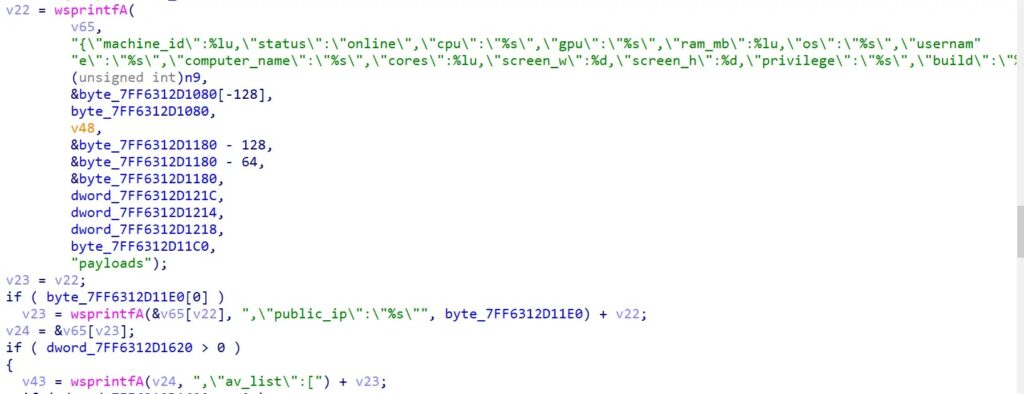
The implant also checks for crypto wallets, messengers, mail clients, 2FA tools, file transfer tools, and Steam. Elastic said the analyzed sample did not directly steal wallet, browser, messenger, or credential data. Instead, it used the installed-app list to help operators choose follow-on payloads.
The Elastic PHANTOMPULSE deep dive says the command dispatcher contains eight handlers, not dozens. They include inject, drop, screenshot, keylog, uninstall, elevate, downgrade, and a self-restart-like handler that relies on persistence to bring the implant back.
Attribution signals point toward DPRK-aligned crypto campaigns
Elastic said PHANTOMPULSE tradecraft aligns with DPRK-aligned crypto-targeting clusters, including Lazarus, BlueNoroff, UNC5342, and APT38. The assessment rests on overlapping targeting, cross-platform tooling, Telegram use, crypto wallet enumeration, and blockchain-based C2 methods.
The connection should be treated as alignment with known DPRK patterns, not as proof that one named group alone operated every part of the campaign. Elastic also noted that PHANTOMPULSE’s blockchain resolver differs in implementation from the activity described in the DPRK EtherHiding report.
That distinction matters for defenders. Technique overlap can help with hunting, but incident teams still need to rely on confirmed indicators, local telemetry, and behavior patterns before making attribution decisions.
Detection guidance and IoCs
Security teams should monitor child processes launched by Obsidian, especially powershell.exe, cmd.exe, sh, bash, or zsh. They should also watch for rundll32.exe loading unexpected DLLs from AssetMon paths and for scheduled tasks that imitate .NET maintenance jobs.
Elastic published a Windows.Trojan.PhantomPulse YARA rule for threat hunters. Organizations can combine static YARA coverage with behavior-based detections for Obsidian plugin abuse, PowerShell execution, process injection, and suspicious scheduled task registration.
Defenders should also map the activity to the Process Injection technique and the Bypass User Account Control technique. These mappings help detection teams organize telemetry and prioritize endpoint events.
| Type | Indicator | Description |
|---|---|---|
| SHA-256 | 33dacf9f854f636216e5062ca252df8e5bed652efd78b86512f5b868b11ee70f | PHANTOMPULSE RAT final payload |
| SHA-256 | 70bbb38b70fd836d66e8166ec27be9aa8535b3876596fc80c45e3de4ce327980 | syncobs.exe PHANTOMPULL loader |
| SHA-256 | def66275fa3baffb16e6e4ae0297861d9790ae7161fbc271a2ba05d121f13c70 | Go beacon GTESTIC_WIN check-in |
| Domain | panel.fefea22134[.]net | PHANTOMPULSE hardcoded fallback C2 panel |
| Domain | fea22134[.]net | C2 domain encrypted in binary |
| IPv4 | 195.3.222[.]251 | Staging server for PowerShell and loader delivery |
| Wallet | 0xc117688c530b660e15085bF3A2B664117d8672aA | Blockchain C2 resolver wallet |
| Mutex | hVNBUORXNiFLhYYh | Single-instance mutex |
How organizations can reduce PHANTOMPULSE risk
Organizations in cryptocurrency, finance, and software development should treat unsolicited investment, recruiter, and collaboration messages with caution. The REF6598 campaign shows that attackers may use legitimate apps and community plugin ecosystems rather than obvious malware attachments.
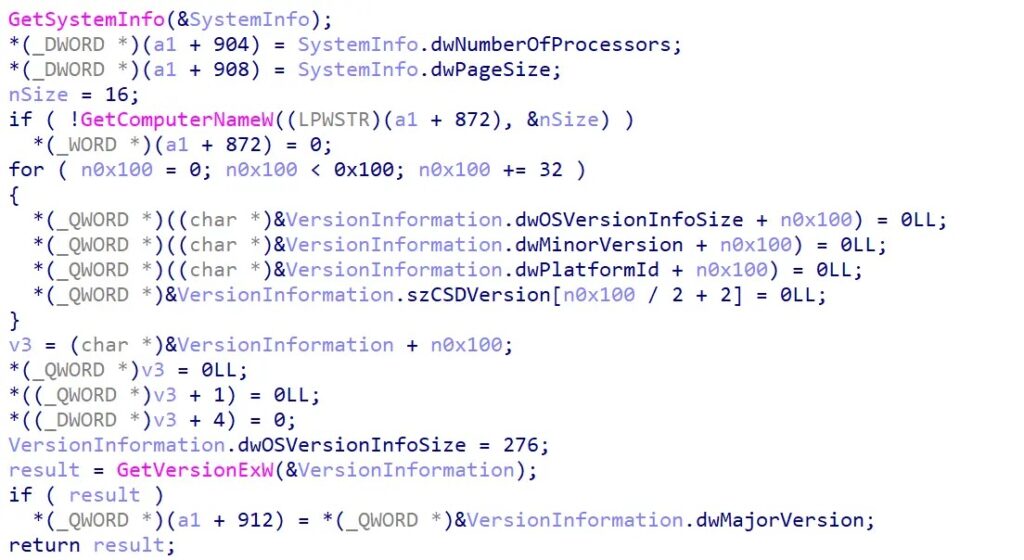
Companies that allow Obsidian should define plugin policies and monitor plugin configuration files. The earlier Elastic REF6598 analysis shows that community plugin sync created the execution path only after the victim enabled the relevant settings.
Endpoint teams should look for PowerShell launched by Obsidian, unknown rundll32.exe activity, tasks named like DotNetSvcUpdateTask, and attempts to use debug APIs in suspicious processes. Reviewing the public DbgNexum technique can also help defenders understand the behavior PHANTOMPULSE adapted.
- Restrict or review Obsidian community plugins in high-risk environments.
- Alert on Obsidian launching PowerShell, cmd.exe, or shell processes.
- Hunt for suspicious rundll32.exe executions that load DLLs from user-writable paths.
- Audit scheduled tasks under .NET-themed task paths.
- Monitor unusual access to Blockscout providers from endpoints.
- Deploy and test Elastic’s YARA rule alongside behavior analytics.
- Investigate hardware-breakpoint patterns tied to AMSI, WLDP, and ETW bypass attempts.
- Remove persistence artifacts in one coordinated cleanup action to prevent self-healing.
FAQ
PHANTOMPULSE is a Windows remote access trojan analyzed by Elastic Security Labs. It is the final-stage payload in the REF6598 intrusion set and supports remote access, process injection, persistence, screenshot capture, keylogging, system reconnaissance, and command execution.
The campaign starts with social engineering that abuses Obsidian community plugin sync. Victims are persuaded to open an attacker-controlled vault and enable plugin sync, which allows the Shell Commands plugin to run attacker-defined commands and deliver the PHANTOMPULL loader before PHANTOMPULSE runs.
PHANTOMPULSE uses in-memory loading, process injection, direct syscalls, hardware-breakpoint-based defense evasion, scheduled task persistence, and blockchain-based C2 resolution. These techniques can reduce visible files on disk and make network blocking harder.
Elastic said the analyzed sample did not directly steal wallet, browser, messenger, or credential data. It checked whether high-value apps such as cryptocurrency wallets were installed, likely so operators could choose follow-on payloads.
Organizations should monitor Obsidian launching shell processes, suspicious PowerShell activity, rundll32.exe loading DLLs from unusual paths, suspicious scheduled tasks, Blockscout access from endpoints, hardware-breakpoint behavior, and the published PHANTOMPULSE IoCs.


Read our disclosure page to find out how can you help VPNCentral sustain the editorial team Read more


Improve this guide




User forum
0 messages