
Rokarolla Android Malware Targets Banking and Crypto Apps With Device Takeover Features


 7 min. read
  Published on
Rokarolla is a newly identified Android banking trojan that can steal financial credentials, intercept SMS messages, capture lock screen data, and abuse Accessibility Services to control infected devices. Researchers at Zimperium zLabs say the malware targets 217 banking and cryptocurrency apps.
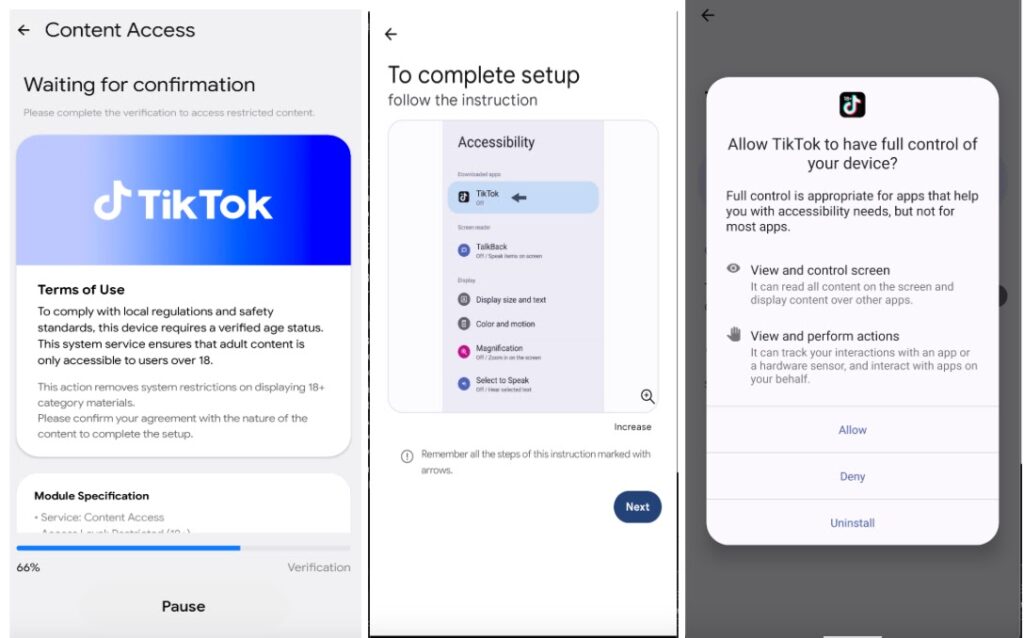
The malware spreads through malicious websites that impersonate popular apps, including TikTok and Google Chrome. Victims are tricked into installing a fake app, after which a dropper installs the main malicious payload on the device.

Access content across the globe at the highest speed rate.
🔥 Save 81% + 2 bonus months! 🔥
70% of our readers choose Private Internet Access
70% of our readers choose ExpressVPN
2
Browse the web from multiple devices with industry-standard security protocols.
🔥 Save 73%! 🔥

Faster dedicated servers for specific actions (currently at summer discounts)
🔥 Save 69%! 🔥
Rokarolla is especially dangerous because it combines banking overlay attacks with broader surveillance and remote-control capabilities. It can hide from users, mute notifications, block calls, capture screen content, and attempt to disable Google Play Protect.
Rokarolla is built for financial theft and device control
According to the Zimperium research, Rokarolla is named after its command-and-control infrastructure. The malware supports 137 commands that let attackers collect device data, steal credentials, monitor activity, and interfere with normal phone behavior.
Once installed, the trojan checks the device for targeted financial apps. If it finds one, it can display a fake login page over the real app. The user thinks they are signing in to their bank or crypto wallet, but the malware captures the entered credentials.
The malware also targets lock screen PINs, patterns, and passwords through fake overlays. This gives attackers another path to access the device and continue fraudulent activity even when the phone locks.
| Capability | What Rokarolla can do | Risk for users |
|---|---|---|
| Overlay attacks | Places fake login pages over real banking and crypto apps | Can steal usernames, passwords, card details, and wallet credentials |
| SMS interception | Reads SMS messages and can target one-time passcodes | Can help attackers bypass account verification |
| Call blocking | Can interfere with incoming calls | May prevent fraud alerts from banks or service providers |
| Clipboard manipulation | Can replace copied text, including crypto wallet addresses | Can redirect payments to attacker-controlled accounts |
| Screen monitoring | Captures screenshots instead of relying only on live screen sharing | Can expose sensitive activity on the device |
The malware abuses Android Accessibility Services
Rokarolla relies heavily on Android Accessibility Services, a legitimate feature designed to help users interact with their devices. Malware families often abuse this feature because it can let an app read screen content, click buttons, and automate actions after the user grants permission.
In Rokarolla’s case, the malware uses accessibility access to inspect the screen, track which app is open, inject fake pages, and automate actions. This makes it harder for a victim to distinguish between the real banking app and a malicious overlay.
Google says Google Play Protect checks apps during installation and periodically scans devices for harmful apps. However, Rokarolla specifically tries to weaken that protection by targeting Play Protect settings after infection.
Rokarolla tries to stay hidden after infection
The trojan uses several tricks to reduce the chance that victims notice it. It can hide its app icon, suppress sounds and vibrations, keep the screen awake, and display deceptive overlays that block normal device interaction.
Those tactics matter because banking fraud often depends on timing. If a victim does not hear alerts, receive a call, or notice suspicious screen behavior, attackers get more time to complete unauthorized actions.
Google’s Play Protect documentation says the service automatically scans apps on Android phones and works to prevent the installation of harmful apps. Users should keep it enabled and should treat any app asking them to turn off security protections as suspicious.
- Avoid installing Android apps from random websites, messages, or social media links.
- Download apps from official stores and verified developer pages.
- Do not grant Accessibility permission to apps that do not clearly need it.
- Keep Google Play Protect turned on.
- Restart the device and remove suspicious apps if the phone behaves strangely.
Attackers use screenshots, SMS theft, and clipboard hijacking
Rokarolla also uses a snapshot-based screen monitoring method. Instead of relying only on continuous live screen casting, it captures screenshots at intervals, compresses them, and sends them to attacker-controlled infrastructure with timing details.
This gives attackers a near real-time view of sensitive activity, including app screens, login forms, messages, and payment flows. Combined with keylogging and overlay attacks, the malware can collect enough information to hijack financial accounts.
Security firm Malwarebytes also reported that Rokarolla can steal banking logins, intercept SMS codes, and take over infected Android devices. That matches Zimperium’s warning that this is more than a simple credential stealer.
| Threat behavior | What users may notice | What to do |
|---|---|---|
| Fake app installation | An app claims to be TikTok, Chrome, Play Protect, or an update tool | Uninstall it and scan the device |
| Accessibility permission request | A non-accessibility app asks for broad device control | Deny the request unless the app has a clear, trusted reason |
| Muted alerts | Bank alerts, calls, or notifications do not appear as expected | Check security settings and contact the bank from another device |
| Clipboard changes | A copied crypto wallet address changes before sending | Stop the transaction and verify the device |
How Android users can reduce the risk
The most important defense is to avoid sideloading apps from unknown websites. Rokarolla’s distribution method depends on convincing users to install fake apps that look familiar.
Users should also review Accessibility permissions regularly. If an unknown app has Accessibility access, remove that permission and uninstall the app. Banking and crypto users should be especially careful because these permissions can let malware read screen content and automate clicks.
The Google Play Protect help page says Play Protect can warn users, disable harmful apps, or remove harmful apps automatically in many cases. Users should also enable the option to send unknown apps to Google for improved harmful app detection.
What organizations should watch for
Rokarolla also creates risk for companies that allow personal Android devices to access work email, cloud dashboards, messaging apps, or crypto-related workflows. A compromised personal phone can expose SMS codes, contacts, messages, and business accounts.
Security teams should review mobile device management policies, block app sideloading where possible, and monitor for suspicious accessibility permission use. Financial institutions should also treat sudden login changes, SMS interception signs, and unusual payment behavior as potential mobile compromise indicators.
The Google Play Protect overview describes Play Protect as a built-in malware defense backed by Google’s machine learning. That protection helps, but it does not remove the need for user caution, app-source controls, and prompt response to suspicious behavior.
Rokarolla shows Android banking malware is becoming broader
Rokarolla reflects a wider shift in Android banking malware. Modern trojans no longer focus only on stealing login credentials. They now combine phishing overlays, screen monitoring, SMS theft, call control, clipboard hijacking, notification abuse, and device automation.
That wider control makes recovery harder. A victim may need to clean the device, change passwords from a separate trusted device, revoke sessions, contact banks, and review recent crypto or financial transactions.
Malwarebytes notes that users who download apps only from official stores are safer from this campaign. The broader lesson is clear: do not trust app download links from websites, ads, messages, or social media posts just because they use the name of a popular app.
For Android users, the safest approach is to keep Play Protect enabled, avoid unknown APK files, watch permission prompts closely, and act quickly if a banking or crypto app shows unexpected login screens or device behavior.
FAQ
Rokarolla is an Android banking trojan that targets banking and cryptocurrency apps. It can steal credentials, intercept SMS messages, capture screen content, abuse Accessibility Services, and attempt to control infected devices.
Rokarolla spreads through malicious websites that impersonate popular apps such as TikTok or Google Chrome. Users are tricked into installing a fake app, which then installs the main malware payload.
Zimperium says Rokarolla attempts to disable or interfere with Google Play Protect after infection. Users should keep Play Protect enabled and avoid any app that asks them to weaken Android security settings.
Download apps only from trusted stores, keep Google Play Protect enabled, avoid unknown APK files, deny suspicious Accessibility permission requests, and keep Android security updates installed.
Disconnect from sensitive accounts, uninstall suspicious apps, run a Play Protect scan, change important passwords from another trusted device, contact your bank, and review recent transactions for fraud.


Read our disclosure page to find out how can you help VPNCentral sustain the editorial team Read more


Improve this guide




User forum
0 messages