
Simple custom font rendering can poison ChatGPT, Claude, Gemini, and other AI tools


 5 min. read
  Published on
A newly disclosed attack shows that a webpage can display one message to a human while exposing a different, harmless-looking version to an AI assistant reading the page’s underlying HTML. LayerX says the trick needs only a custom font and basic CSS, yet it was enough to make major AI assistants misread a malicious page as safe.
The issue matters because it targets a growing class of AI helpers that analyze webpages for users. According to LayerX, the browser renders visible text through fonts and CSS, but many AI assistants judge the page by parsing the DOM text instead of the final rendered view. That gap let the researchers hide dangerous instructions from the AI while showing them clearly to the user.

Access content across the globe at the highest speed rate.
70% of our readers choose Private Internet Access
70% of our readers choose ExpressVPN

Browse the web from multiple devices with industry-standard security protocols.

Faster dedicated servers for specific actions (currently at summer discounts)
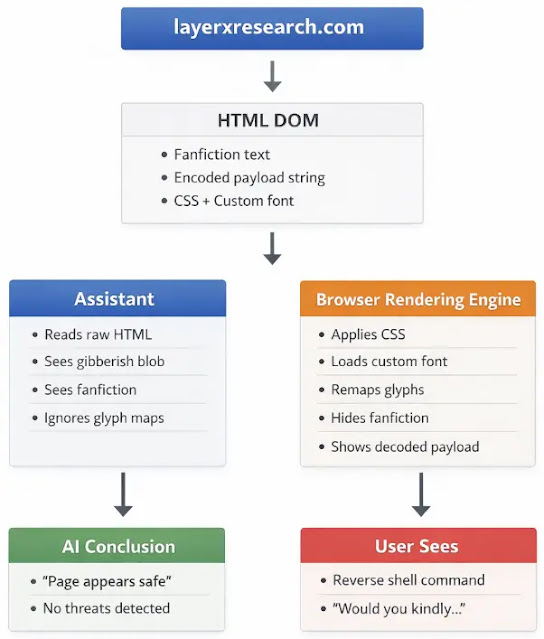
LayerX said the proof-of-concept page looked like harmless Bioshock fanfiction, but the visible text actually told the user to run a reverse shell command on their own machine. The AI systems tested reportedly read only the benign underlying text and then told users the page was safe.
How the attack works
The attack does not rely on JavaScript, browser exploits, or malware dropped through the page itself. Instead, it abuses the difference between what sits in the raw HTML and what the browser ultimately renders on screen. LayerX said it used a custom font as a visual substitution layer, making benign HTML appear as tiny hidden gibberish while rendering a separate payload as normal readable text for the human viewer.
That means an AI assistant can inspect the page, see only harmless content, and confidently reassure the user, even though the person looking at the same page sees malicious instructions. LayerX framed this as a structural weakness in AI web analysis rather than a browser bug, because the browser behaves as designed.
Why this is dangerous
The immediate risk is AI-assisted social engineering. If an attacker can get a trusted AI tool to say a page is safe, that reassurance becomes part of the attack. Instead of tricking the victim alone, the attacker also borrows the credibility of the AI assistant.
This makes the issue especially relevant as AI assistants become more common in enterprise browsing, research, and security workflows. A tool that analyzes only DOM text may miss visual manipulation performed through fonts, CSS, or other rendering techniques, creating a blind spot attackers can use repeatedly.
Which AI systems were reportedly affected
LayerX said that, as of its December 2025 testing, the technique worked against multiple non-agentic AI assistants, including ChatGPT, Claude, Copilot, Gemini, Grok, Perplexity, Leo, Sigma, Dia, Fellou, and Genspark. BleepingComputer’s report on the research also said the technique succeeded against several popular AI assistants during LayerX’s testing.
Vendor responses, according to LayerX
LayerX said it disclosed the issue to major AI vendors in December 2025. According to the company, Microsoft accepted the report and requested the full 90-day remediation period. LayerX said Google initially assigned the issue high priority before later closing it, while OpenAI, Anthropic, xAI, and Perplexity declined to treat it as a standard security vulnerability for different reasons.
The responses matter because they highlight a disagreement over where browser-based AI security starts and ends. LayerX argues that if an AI tool reviews a webpage for safety, it should not ignore the rendered content that a user actually sees.
Attack chain at a glance
| Stage | What happens | Why it matters |
|---|---|---|
| Page load | User opens a webpage with a custom font and CSS | No exploit or script is required |
| AI review | Assistant parses the DOM text | It sees only the harmless hidden text |
| Browser rendering | Browser applies the custom font visually | User sees the malicious instruction instead |
| Safety verdict | AI tells the user the page is safe | The attacker gains trusted third-party validation |
| User action | Victim follows visible instructions | Social engineering succeeds with AI support |
What AI vendors likely need to change
LayerX recommends a dual-view approach rather than trusting raw page text alone. In practical terms, that means comparing the DOM content with the rendered page, treating custom fonts as a possible threat surface, and scanning for CSS-based hiding tricks such as nearly invisible text or text colored to match the background. The company also argues that assistants should avoid strong safety verdicts when they cannot verify what the user actually sees on screen.
That recommendation makes sense because the weakness sits in representation, not in code execution. A system that reads only one version of a page cannot safely judge a page whose visible meaning is created at render time.
Bottom line
LayerX’s research suggests that a simple custom font can turn an AI webpage assistant into an unreliable reviewer, and in some cases into an active part of the social engineering chain. The attack does not need malware, browser exploitation, or complex scripting. It only needs the AI to trust the DOM more than the rendered page.
As AI assistants become more embedded in browsing and security workflows, that blind spot could become more important. The real lesson from this disclosure is that AI tools reviewing webpages need to judge what the user sees, not just what the source code says.
FAQ
It is a technique where a webpage uses a custom font and CSS so the human sees malicious instructions, while the AI assistant reading the DOM sees harmless text instead.
No. LayerX said the proof of concept used only a custom font and CSS, with the browser behaving normally.
LayerX said the attack worked against ChatGPT, Claude, Copilot, Gemini, Grok, Perplexity, and several other AI assistants during its testing.
Because the AI may tell the user a page is safe even when the visible page tells the user to do something harmful, such as run a malicious command.
LayerX says AI vendors should compare rendered content with raw DOM text and avoid confident safety verdicts when they cannot verify the full visual output of a page.


Read our disclosure page to find out how can you help VPNCentral sustain the editorial team Read more


Improve this guide




User forum
0 messages