
SmartApeSG ClickFix Campaign Uses Fake Verification Pages to Push RAT Malware on Windows


 9 min. read
  Published on
The SmartApeSG campaign is using fake verification pages and ClickFix instructions to trick Windows users into running malicious commands. The latest observed chain delivers an unidentified remote access trojan first, then follows with a malicious NetSupport Manager RAT package for persistent control.
Researchers at the SANS Internet Storm Center documented the activity after a May 27, 2026 infection. The first-stage RAT generated encoded traffic to a command-and-control server over TCP port 443, while the second stage installed NetSupport RAT components on the host.

Access content across the globe at the highest speed rate.
70% of our readers choose Private Internet Access
70% of our readers choose ExpressVPN

Browse the web from multiple devices with industry-standard security protocols.

Faster dedicated servers for specific actions (currently at summer discounts)
ClickFix attacks rely on social engineering rather than a direct software exploit. A fake page tells the victim to copy and run a command to complete a browser check, CAPTCHA, or verification step. In reality, that command starts the malware infection chain.
How the SmartApeSG ClickFix infection starts
The attack begins when a user lands on a compromised or malicious website that shows a fake verification page. The page instructs the visitor to open the Windows Run dialog or a command prompt and paste a copied script.
Malware-Traffic-Analysis.net describes ClickFix as a social engineering technique that uses clipboard hijacking and paste-and-run instructions to make victims execute malicious commands themselves. This method has become more common since 2024 because it bypasses many traditional download warnings.
Once the victim runs the command, the script reaches attacker-controlled infrastructure and downloads the first payload. In the May 2026 case, that first payload was an unidentified RAT that then helped deliver a malicious NetSupport Manager RAT package.
Key details at a glance
| Item | Details |
|---|---|
| Campaign | SmartApeSG, also known in some reporting as ZPHP or HANEYMANEY |
| Main lure | Fake verification or ClickFix page |
| Target platform | Windows |
| Initial payload | Unidentified RAT with encoded traffic over TCP port 443 |
| Follow-up payload | Malicious NetSupport Manager RAT package |
| Observed date | May 27, 2026 |
The attack stands out because it does not stop after the first payload. The initial RAT communicates with its C2 server, receives follow-up files, and prepares the host for a second-stage remote access tool that can survive reboots.
That approach gives attackers flexibility. The first RAT can act as a loader and control channel, while NetSupport provides a familiar remote administration interface that attackers can use for hands-on-keyboard activity.
Why NetSupport Manager keeps appearing in malware campaigns
NetSupport Manager is a legitimate remote access tool, but attackers often misuse it after gaining initial access. Red Canary notes that NetSupport Manager is so frequently abused that researchers often refer to malicious use of it as NetSupport RAT.
For attackers, this creates a useful blend of legitimacy and control. Security tools may not always treat remote administration software as malware by default, especially if the package resembles a normal installer or uses expected file names.
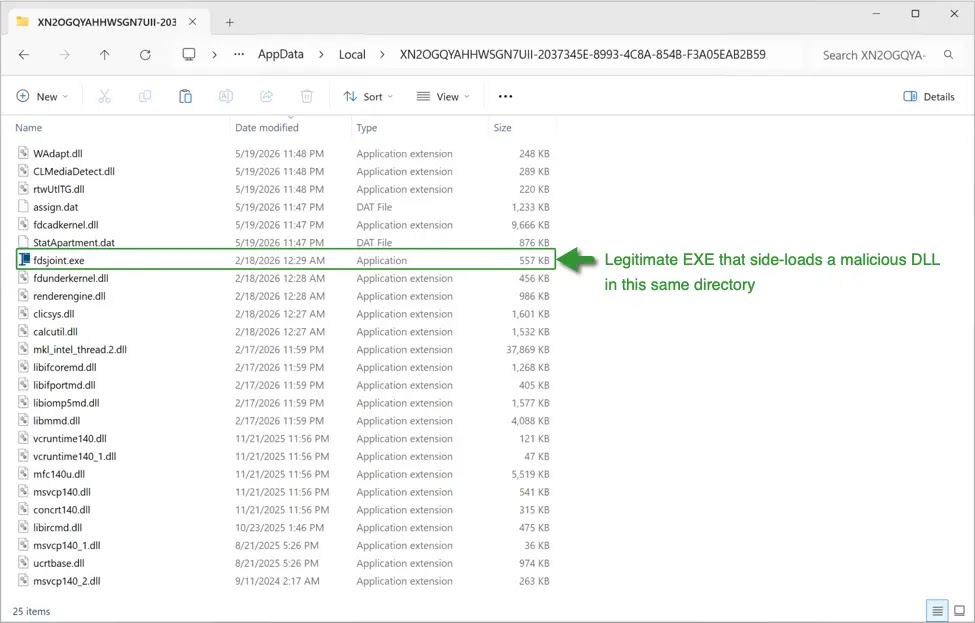
In the SmartApeSG chain, the NetSupport package arrived after the first RAT was already running. A CAB archive was extracted on the system, and scripts were used to install the remote access components and configure persistence.
How the two-stage payload works
| Stage | Observed behavior | Defender concern |
|---|---|---|
| Initial access | Fake verification page tells the user to run a copied command | User-driven execution through ClickFix social engineering |
| First payload | Unidentified RAT connects to C2 over TCP port 443 | Encoded traffic may blend with expected outbound web traffic |
| Second payload | NetSupport RAT package arrives through follow-up files | Remote control and persistence |
| Cleanup | Installer scripts can be deleted after setup | Reduced forensic visibility |
eSentire has also tracked the broader move from fake update lures to ClickFix delivery. In its research on NetSupport RAT loaders delivered via ClickFix, the company said multiple threat groups shifted toward this paste-and-run approach during 2025.
That shift matters for Windows defenders because the victim performs the execution step. Instead of relying only on a malicious attachment or drive-by download, the attacker convinces the user to run the command inside a trusted Windows interface.
SmartApeSG has used similar tactics before
SmartApeSG has a history of using fake browser updates, fake CAPTCHA pages, and ClickFix-style lures to distribute remote access malware. Blumira reported in April 2026 that the group’s goal remained consistent: trick users into downloading and running payloads that lead to remote access software, most often NetSupport Manager.
Earlier SmartApeSG activity also used fake update pages. The campaign has changed delivery details over time, but the core idea remains the same: make the user believe they must complete a simple browser, verification, or update task.
The latest May 2026 chain adds another layer by placing an unidentified RAT before the NetSupport package. That gives attackers a staging point before deploying a more recognizable remote access tool.
Observed indicators of compromise
| Type | Indicator | Description |
|---|---|---|
| URL | hxxps[:]//hiddenplanetlab[.]top/signin/secure-util.js | SmartApeSG malicious URL observed May 27, 2026 |
| URL | hxxps[:]//hiddenplanetlab[.]top/signin/private-template?c66kjD5i | SmartApeSG malicious URL observed May 27, 2026 |
| URL | hxxps[:]//hiddenplanetlab[.]top/signin/legacy-worker.js?18b3825af007e53d | SmartApeSG malicious URL observed May 27, 2026 |
| IP address | 178.156.165[.]82 | ClickFix script C2 traffic |
| IP address | 178.156.173[.]194 | ClickFix script C2 traffic |
| URL | hxxps[:]//silverharvestnetwork[.]com/check | ClickFix script C2 traffic and initial RAT ZIP host |
| IP address | 89.110.110[.]119:443 | Initial RAT C2 server using encoded non-HTTPS traffic |
| IP address | 185.163.47[.]217:443 | NetSupport RAT C2 server |
| SHA-256 | 1514b1268e9dc6d2f37137aa38c756cb4bf8186ac9235d6863b78e7f8bbbe976 | ZIP archive containing initial RAT package |
| SHA-256 | 469bac8e10f50263e8ff0806e6ba126bb4cc660799129a8653eab3f8ec7201e5 | processor.vbs file that runs token.bat |
| SHA-256 | 9c7eda2c4d3aaa8746495741bef57a07de180f0409409faf0f91658e88ba33f5 | token.bat installer script for NetSupport RAT |
| SHA-256 | 7ba5481c873bb3081442561f749f590badd72ef249fddfe993e30b28dc0c2112 | setup.cab archive containing malicious NetSupport RAT package |
| File path | C:\ProgramData\processor.vbs | Initial VBScript dropped on infected host |
| File path | C:\ProgramData\token.bat | Batch script dropped on infected host |
| File path | C:\ProgramData\setup.cab | CAB archive dropped on infected host |
| File path | C:\ProgramData\UpdateInstaller\ | Extraction directory for NetSupport RAT contents |
The ISC diary notes that the initial RAT’s port 443 traffic was encoded but not HTTPS, SSL, or TLS. That is an important network clue because it can stand out from normal encrypted web browsing when defenders inspect session metadata.
Organizations should not rely only on static indicators because SmartApeSG infrastructure changes. Domain names, file hashes, and payload locations can rotate quickly, so behavioral detection matters just as much as blocklists.
Detection opportunities for defenders
- Watch for PowerShell, mshta, wscript, cscript, cmd, or rundll32 execution shortly after browser activity.
- Alert on users pasting commands into the Windows Run dialog after visiting unknown websites.
- Inspect outbound traffic to TCP port 443 that does not use normal TLS handshakes.
- Monitor C:\ProgramData\ for newly created VBS, BAT, CAB, ZIP, or remote access tool files.
- Look for NetSupport client components launched from unusual directories.
- Review registry Run keys and scheduled tasks for persistence linked to remote access tools.
- Block newly registered or low-reputation domains used in fake verification pages.
The technique also maps closely to user execution. MITRE ATT&CK T1204.004 covers malicious copy-and-paste behavior, where attackers trick users into copying and running commands on their own systems.
Security awareness training should now include ClickFix examples. Users should know that legitimate verification pages do not ask them to open Run, paste a PowerShell command, or execute a script to prove they are human.
Why ClickFix works so well
ClickFix succeeds because it turns the victim into the execution mechanism. The page gives simple instructions, the copied command looks technical, and the user may believe they are fixing a browser or access problem.
Malware-Traffic-Analysis.net has described ClickFix pages as instructions that tell victims to paste malicious content into a Run window or terminal. This makes the attack especially risky in corporate environments where users have local scripting access.
Endpoint controls can help reduce the risk. Organizations can restrict script interpreters, block untrusted PowerShell execution, limit user access to administrative tools, and alert on suspicious command-line patterns.
NetSupport abuse creates hands-on intrusion risk
Malicious NetSupport use can give attackers remote visibility and control after the initial infection. According to Red Canary’s NetSupport Manager profile, adversaries can use the client component to control systems, upload files, and execute commands.
This creates a different risk from basic credential theft. A remote access tool can support interactive intrusion, internal reconnaissance, lateral movement, and follow-up malware deployment.
The eSentire report on ClickFix-delivered NetSupport loaders also notes that attackers commonly use social engineering to make users execute malicious commands through the Windows Run prompt. That behavior should become a priority detection target.
How organizations can reduce exposure
| Control | Recommended action | Why it helps |
|---|---|---|
| Script control | Restrict PowerShell, mshta, wscript, and cscript for standard users where possible | Limits common ClickFix execution paths |
| Endpoint monitoring | Alert on browser-to-script execution chains | Detects suspicious activity after fake verification pages |
| Network inspection | Flag non-TLS traffic over TCP port 443 | Helps identify encoded RAT traffic that mimics web traffic by port only |
| Remote tool governance | Maintain an allowlist of approved remote access tools and paths | Helps separate legitimate support tools from attacker-deployed packages |
| User training | Teach users never to paste commands from websites into Run or PowerShell | Blocks the social engineering step that starts the infection |
Blumira’s research on SmartApeSG activity shows that the campaign continues to evolve its obfuscation and delivery methods while keeping the same remote-access objective. That means defenders should expect new scripts, domains, and payload packaging.
MITRE’s malicious copy-and-paste technique gives teams a useful framework for detection engineering. The key signal is not only the payload, but also the user-driven command execution pattern that follows a web lure.
The SmartApeSG campaign shows how a simple fake verification page can lead to full remote access on a Windows host. Blocking the first click helps, but organizations also need controls that catch the copied command, the outbound loader traffic, and the follow-up NetSupport installation.
FAQ
SmartApeSG is a malware campaign also known in some reporting as ZPHP or HANEYMANEY. It has used fake browser updates, fake CAPTCHA pages, and ClickFix-style lures to deliver remote access malware such as NetSupport RAT.
ClickFix is a social engineering technique that tricks users into copying and running a malicious command, often through the Windows Run dialog, PowerShell, or a terminal. The lure usually appears as a fake verification, CAPTCHA, or browser fix page.
The observed May 2026 chain delivered an unidentified first-stage RAT, followed by a malicious NetSupport Manager RAT package that was installed for persistent remote access.
The initial RAT used TCP port 443 for command-and-control traffic, but the traffic was encoded rather than normal HTTPS. Defenders can look for port 443 sessions that do not follow expected TLS behavior.
Organizations should train users not to run commands from websites, restrict script interpreters where possible, monitor browser-to-script execution chains, inspect suspicious port 443 traffic, and alert on unexpected NetSupport components or remote access tools.


Read our disclosure page to find out how can you help VPNCentral sustain the editorial team Read more


Improve this guide




User forum
0 messages