
Solana FakeFix Campaign Uses Malicious npm and PyPI Packages to Steal Developer Secrets


 7 min. read
  Published on
A newly uncovered software supply chain campaign is targeting Solana developers through malicious npm and PyPI packages. The operation, tracked as Solana FakeFix by JFrog Security Research, used fake Solana developer packages to steal wallet files, SSH keys, cloud credentials, source-control tokens, and environment secrets.
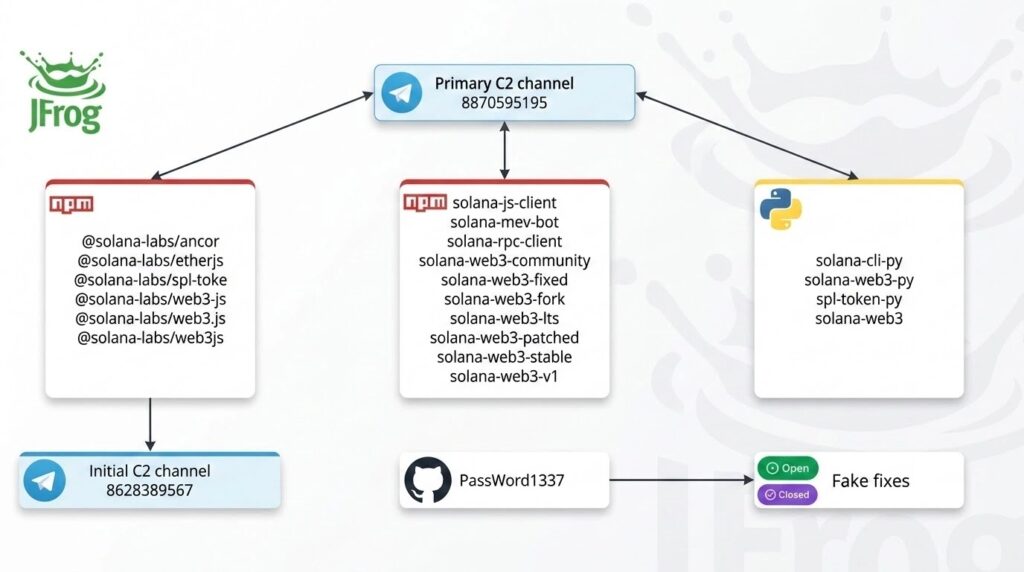
The full campaign includes 25 malicious package indicators. The Solana FakeFix cluster contains 20 packages, split between 16 npm packages and 4 PyPI packages. A related CMS Windows loader cluster adds 5 more npm packages that installed hidden payloads on Windows systems.

Access content across the globe at the highest speed rate.
70% of our readers choose Private Internet Access
70% of our readers choose ExpressVPN

Browse the web from multiple devices with industry-standard security protocols.

Faster dedicated servers for specific actions (currently at summer discounts)
The attack matters because it targets developers at the point where they are most exposed: dependency installation, local testing, and CI builds. A single install or import could give attackers access to private keys, cloud tokens, GitHub tokens, npm tokens, and other secrets stored on the machine or in the build environment.
Fake Solana fixes were used as the lure
The malicious packages were designed to look like useful Solana tooling. Some names copied trusted Solana-style branding, including @solana-labs/web3.js, solana-web3-stable, solana-rpc-client, and solana-web3-fixed.
JFrog said the attacker promoted at least one package through GitHub issue spam. The account behind the spam framed the malicious package as a community-maintained fix for Solana build and type problems. JFrog researchers said nine GitHub issues were opened across different projects before the text was later edited down.
This made the campaign more convincing than basic typosquatting. Developers looking for a fast fix to dependency conflicts could mistake the package for a legitimate patched build or a community fork.
How the npm and PyPI packages executed malware
The npm packages abused install-time behavior. Several variants used a postinstall script, which can run as part of the package installation process. The official npm lifecycle scripts documentation explains how lifecycle events can run scripts during package workflows.
That means a developer did not need to call the malicious package inside an app for the first payload to run. Installing the dependency could be enough. This is especially risky in CI pipelines where package installs often happen with access to deployment tokens and environment variables.
The PyPI packages used a different trigger. Their malicious code lived in __init__.py, a file that Python uses when treating directories as packages. The official Python documentation notes that __init__.py can execute initialization code when a package is imported.
| Package ecosystem | Attack trigger | Main risk |
| npm | Postinstall lifecycle script | Malware can run during dependency installation. |
| PyPI | Code inside __init__.py | Malware can run when the package is imported. |
| CMS npm packages | PowerShell and remote loader behavior | Windows persistence and dynamic payload delivery. |
What the malware tried to steal
The Solana FakeFix payloads searched for high-value developer secrets. These included Solana keypair files, SSH private keys, AWS credentials, .env files, wallet files, and environment variables containing terms such as KEY, SECRET, MNEMONIC, TOKEN, PASSWORD, GITHUB, NPM, and CI.
Solana developers face a direct wallet risk because local keypair files can control funds and deployments. The official Solana CLI documentation says the default wallet keypair path is ~/.config/solana/id.json.
Some variants went beyond one-time theft. JFrog found payloads that created persistence, contacted attacker-controlled Telegram bots, and waited for commands such as grabbing keys, pulling environment variables, collecting wallets, or running shell commands.
A fake MEV bot also asked users for private keys
One package, solana-mev-bot, used a more direct crypto scam. Instead of pretending only to be a patched SDK, it presented itself as an automated MEV profit tool and asked users to paste a Solana private key.
That is a major red flag. No legitimate tool should ask developers to paste a private key into an untrusted package. Once a private key leaves the user’s control, funds in that wallet can be stolen.
The package also searched for other secrets on the machine, which turned the fake MEV lure into both a wallet phishing attempt and a broader developer credential theft tool.
CMS loader packages added a Windows malware angle
The related CMS cluster used different package names, including cms-storehub, cms-helpgit, cms-github, to-cms, and shopifyto-cms. These were not Solana SDK impersonators, but they used the same trust problem in package managers.
Several CMS packages launched PowerShell scripts, attempted to install or use Deno, and fetched remote JavaScript from an attacker-controlled server. Others behaved as download-and-execute droppers for Windows executables.
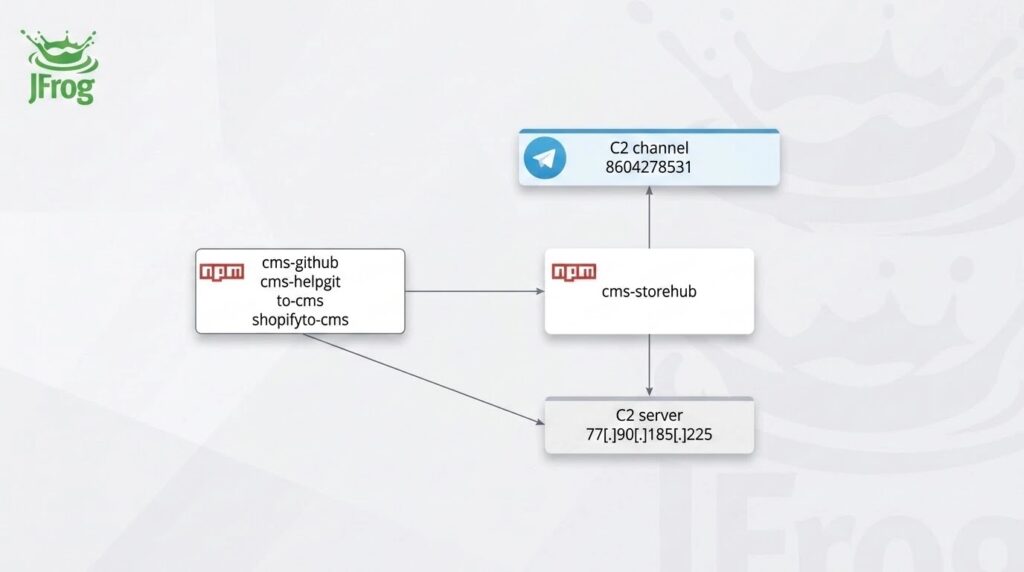
This second cluster shows that the attacker was not focused only on crypto wallets. The campaign also tested broader Windows loader behavior, persistence through Registry Run keys, and dynamic payload retrieval.
Developers should remove packages and rotate secrets
Any developer who installed or imported one of the affected packages should treat the system as compromised. Removing the package alone may not be enough because some payloads created persistence and could have already stolen secrets.
- Remove affected packages from developer machines, CI runners, build workers, and internal caches.
- Review
package-lock.json,yarn.lock,pnpm-lock.yaml,requirements.txt, and other lock files. - Rotate Solana wallets and move funds to new wallets created on a clean device.
- Rotate SSH keys, AWS keys, GitHub tokens, npm tokens, CI secrets, deployment keys, and API keys.
- Audit for Windows Registry Run keys, scheduled tasks, macOS LaunchAgents, Unix crontab entries, and shell profile hooks.
- Rebuild CI runners and build agents from trusted images instead of relying only on cleanup scripts.
Teams should also review package behavior before adding dependencies. The npm scripts documentation is useful for understanding when lifecycle scripts can run, while the Python modules documentation helps explain why import-time package code can create risk.
Solana teams should pay special attention to any system that stored the default local keypair listed in the Solana docs. If that file or any wallet JSON file existed on an affected machine, developers should assume the wallet may no longer be safe.
Affected package names
| Cluster | Package names |
| Solana npm packages | @solana-labs/ancor, @solana-labs/etherjs, @solana-labs/spl-toke, @solana-labs/web3-js, @solana-labs/web3.js, @solana-labs/web3js, solana-js-client, solana-mev-bot, solana-rpc-client, solana-web3-community, solana-web3-fixed, solana-web3-fork, solana-web3-lts, solana-web3-patched, solana-web3-stable, solana-web3-v1 |
| Solana PyPI packages | solana-cli-py, solana-web3, solana-web3-py, spl-token-py |
| CMS Windows loader packages | cms-github, cms-helpgit, cms-storehub, shopifyto-cms, to-cms |
The broader lesson is that package names alone are no longer enough to establish trust. Developers should verify the publisher, project history, source repository, install scripts, and network behavior before adding any package that claims to be a patched build, stable fork, or quick fix.
FAQ
Solana FakeFix is a malicious software supply chain campaign that used fake npm and PyPI packages to target Solana developers and steal wallet files, SSH keys, cloud credentials, source-control tokens, and environment secrets.
JFrog listed 25 malicious package indicators in total. The Solana FakeFix cluster included 20 packages, made up of 16 npm packages and 4 PyPI packages. A related CMS Windows loader cluster added 5 more npm packages.
Several npm packages used postinstall lifecycle scripts. This allowed attacker-controlled JavaScript to run during package installation, before the developer necessarily used the package in an application.
The PyPI packages placed malicious code inside __init__.py. That means the payload could run when the package was imported in a script, notebook, test, or application.
Affected developers should remove the packages, rotate Solana wallets and keypairs, rotate SSH and cloud credentials, audit for persistence, review dependency lock files, and rebuild CI runners or build agents from clean images.


Read our disclosure page to find out how can you help VPNCentral sustain the editorial team Read more


Improve this guide




User forum
0 messages