
WordPress Malware Uses Steam Community Profiles To Hide Command Data


 9 min. read
  Published on

A WordPress malware campaign is using Steam Community profile comments as a covert command-and-control channel, giving attackers a way to hide instructions behind a trusted gaming platform.
GoDaddy Security researchers said the malware fetches encoded data from Steam profile comments, decodes it on compromised WordPress sites, and uses the result to inject malicious JavaScript into public pages. The company detailed the findings in its GoDaddy Security analysis.

Access content across the globe at the highest speed rate.
70% of our readers choose Private Internet Access
70% of our readers choose ExpressVPN

Browse the web from multiple devices with industry-standard security protocols.

Faster dedicated servers for specific actions (currently at summer discounts)
The campaign also includes a server-side PHP backdoor that can modify plugin and theme files. This makes cleanup harder because attackers may restore deleted code if site owners remove only the visible JavaScript injection.
How The Steam Profile C2 Method Works
The malware hides command data in Steam Community profile comments. The visible comments may look like harmless or random text, but invisible Unicode characters inside the comment carry the encoded payload.
When someone visits an infected WordPress site, malicious PHP code sends an HTTP request to a Steam profile page. It then extracts content from the commentthread_comment_text section, decodes the hidden Unicode data, and uses the result as part of the next-stage payload.
BleepingComputer reported that nearly 2,000 WordPress sites were infected with this malware, which used Steam profile comments to store command-and-control data rather than relying only on a conventional attacker-owned server.
| Attack stage | What happens | Why it matters |
|---|---|---|
| WordPress compromise | Attackers add obfuscated PHP code to a theme or plugin file | The site becomes a delivery point for malicious code |
| Steam profile fetch | The malware retrieves comments from Steam Community profiles | Traffic may look less suspicious because it goes to a legitimate platform |
| Unicode decoding | Invisible characters are converted into payload data | Normal text scanning may miss the hidden command content |
| Script injection | The decoded URL is enqueued as a JavaScript file on public pages | Visitors to the infected site can be exposed to malicious browser-side code |
| Backdoor access | Cookie-authenticated requests can trigger code modification | Attackers can regain access after partial cleanup |
Why The Malware Is Difficult To Spot
The campaign stands out because it abuses a legitimate platform in an unusual way. Security tools may flag obvious malicious domains, but Steam Community traffic can blend into normal outbound web traffic unless administrators know what to look for.
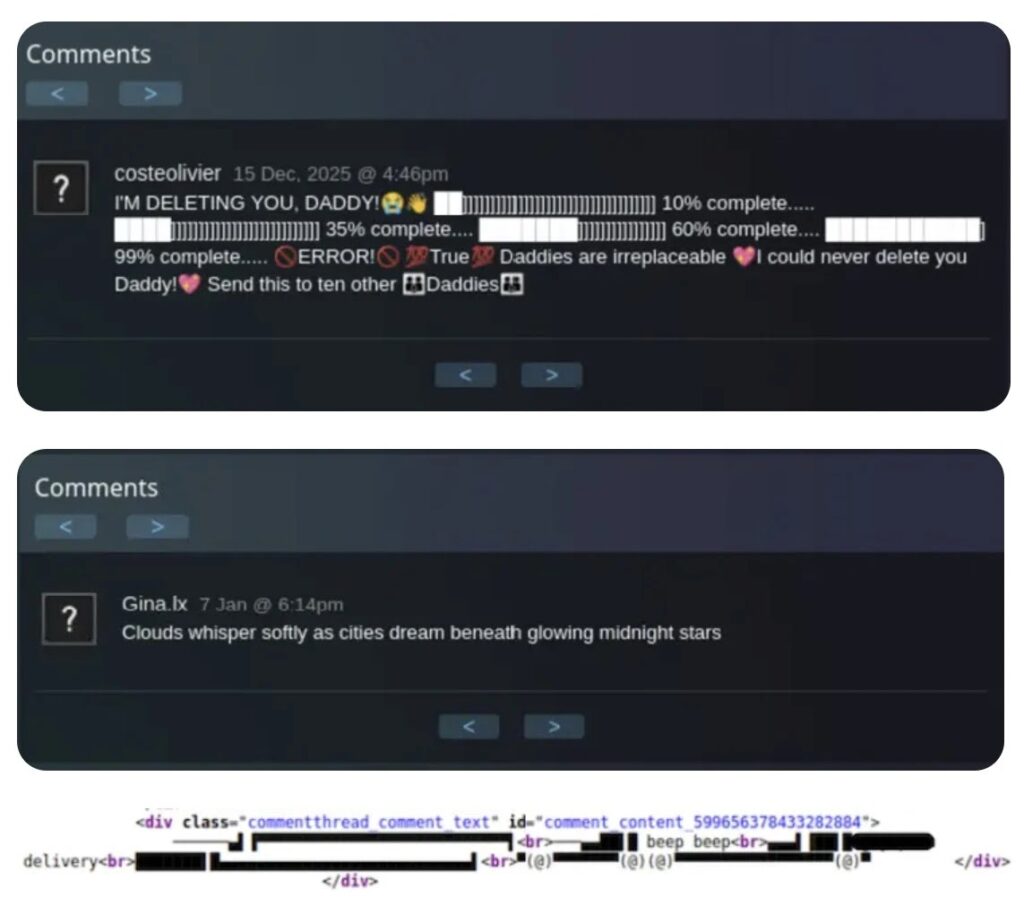
GoDaddy said the malware uses invisible Unicode characters including zero-width non-joiner, zero-width joiner, and other hidden Unicode symbols. These characters allow binary data to sit inside normal-looking comments without appearing clearly in a browser or editor.
The malware also uses WordPress functions in ways that may look routine at first. It uses the wp_enqueue_script function to load the decoded external JavaScript on front-end pages, using a deceptive handle that resembles a normal JavaScript bundle.
Two Attack Chains Hit Site Owners And Visitors
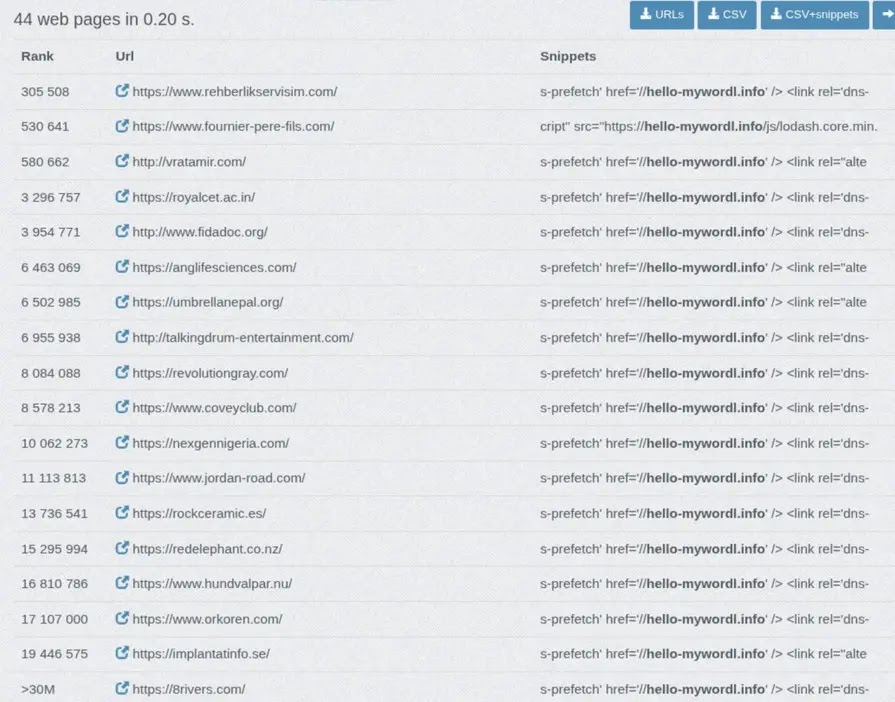
The first attack chain affects visitors. Once the hidden command data is decoded, the malware injects a script that sends users’ browsers to attacker-controlled JavaScript. GoDaddy observed a decoded URL pointing to hello-mywordl[.]info, with a file name crafted to resemble a common JavaScript library.
The second attack chain affects the WordPress site itself. The malware registers a backdoor through the template_redirect hook and waits for POST requests with specific authentication cookies.
According to the technical breakdown, the backdoor can accept base64-encoded PHP code and rewrite plugin and theme files across the installation. It also uses AES-256-CTR encryption, PBKDF2 key derivation, and HMAC authentication to protect command traffic.
- Search for unexpected references to steamcommunity.com in theme and plugin files.
- Check for outbound web requests from WordPress servers to Steam Community profiles.
- Review front-end pages for unknown external JavaScript domains.
- Look for suspicious script handles such as asahi-jquery-min-bundle.
- Investigate transients that use the caption cache pattern.
What Indicators Site Owners Should Check
The most visible sign is an unknown external JavaScript file loaded on public pages. In GoDaddy’s sample, the decoded script host was hello-mywordl[.]info. Site owners should search page source, server logs, theme files, plugin files, and database entries for that domain or similar misspelled library names.
The malware also cached fetched Steam comment data in WordPress transients with a short expiration time. The official WordPress Transients API documentation explains how transients store temporary cached data, which makes them useful for performance but also useful for malware hiding fetched payloads.
Security teams should also inspect recently modified functions.php files, plugin files, and files that include cURL requests, disabled SSL verification, obfuscated strings, mixed-case random function names, or cryptographic functions such as openssl_decrypt and hash_pbkdf2.
| Indicator type | Indicator | Why it matters |
|---|---|---|
| Steam profile | steamcommunity[.]com/profiles/76561199096946028 | Observed profile used to host encoded payload data |
| Steam profile | steamcommunity[.]com/id/ravypadliha | Observed during malware fetching |
| Steam profile | steamcommunity[.]com/id/enomisvool123 | Observed during malware fetching |
| Steam profile | steamcommunity[.]com/id/eremohin342 | Observed during malware fetching |
| External domain | hello-mywordl[.]info | Observed external JavaScript host |
| Script handle | asahi-jquery-min-bundle | Deceptive handle used for script injection |
| Cache pattern | caption_ transients | Used to cache content fetched from Steam profiles |
| Hook | template_redirect | Used by the server-side backdoor path |
How The Backdoor Helps Attackers Stay Inside
The server-side backdoor makes this campaign more serious than a simple script injection. It can modify files after receiving authenticated POST requests, which means the attacker can reinsert malicious code if part of the infection remains active.
That persistence changes the cleanup strategy. Site owners should not assume that deleting a suspicious script from the page source fixes the compromise. The file-writing backdoor must be removed, credentials must be rotated, and all modified plugin and theme files must be checked.
SecurityWeek also noted that the malware abuses Steam profile comments for command-and-control operations and gives attackers a way to hide infrastructure behind a mainstream platform.
Recommended Cleanup Steps For WordPress Sites
Administrators who suspect compromise should place the site in maintenance mode and preserve a backup of the infected state for investigation. This helps retain logs, files, timestamps, and indicators before cleanup changes the evidence.
Next, rotate all credentials. This includes WordPress administrator passwords, hosting control panel credentials, database passwords, FTP or SFTP accounts, SSH keys, and API keys stored in wp-config.php or plugin settings.
After that, restore from a known-clean backup if available. If no clean backup exists, manually inspect every plugin and theme file, especially functions.php, template files, and any code using wp_enqueue_script, template_redirect, cURL, file_put_contents, or suspicious base64 decoding.
- Enable maintenance mode to protect visitors during cleanup.
- Back up the infected site and server logs before deleting files.
- Rotate WordPress, hosting, database, FTP, SFTP, SSH, and API credentials.
- Restore from a clean backup if one exists.
- Delete suspicious transients and unknown external script injections.
- Update WordPress core, themes, and plugins after cleanup.
- Scan for outbound Steam Community requests from the web server.
Why This Campaign Matters For WordPress Security
The campaign shows how attackers can use trusted platforms as hidden infrastructure. Blocking every connection to a mainstream service may not be realistic for all organizations, so detection needs to focus on context, not just destination.
For WordPress owners, outbound PHP requests to Steam Community are unusual and should trigger investigation. A normal WordPress site does not need to scrape Steam profile comments to load pages or scripts.
The WordPress script enqueue system remains a normal and important development feature, but malware can abuse it to make injected scripts look like routine assets. Administrators should compare enqueued scripts against trusted themes, plugins, and known CDNs.
What Hosting Providers And Security Teams Should Monitor
Hosting providers should scan for file patterns tied to this campaign, including Steam Community URLs, hidden Unicode arrays, disabled SSL verification, random mixed-case function names, and cookie-authenticated POST handlers.
They should also review logs for requests containing known authentication cookie names and POST parameters such as new_code, which GoDaddy associated with active backdoor use. Any hit should trigger a full compromise review rather than a simple file removal.
Security teams can use the WordPress Transients API behavior as a hunting clue. Suspicious temporary cache entries tied to Steam profile scraping or unknown JavaScript URLs should be removed and investigated.
Steam Is Being Abused, Not Blamed
The campaign does not mean Steam itself infected WordPress websites. Attackers abused public Steam profile comments as a storage location for encoded data, then made compromised WordPress sites fetch and decode those comments.
BleepingComputer’s coverage described the technique as a way to hide payloads in Steam profiles, while SecurityWeek framed it as command-and-control abuse through a legitimate platform.
The practical takeaway for WordPress owners is clear. If a site contains obfuscated PHP that fetches Steam profile comments, loads unknown JavaScript from hello-mywordl[.]info, or uses the asahi-jquery-min-bundle handle, it should be treated as fully compromised until every backdoor path is removed.
FAQ
It is a malware campaign where compromised WordPress sites fetch hidden command data from Steam Community profile comments. The decoded data is then used to inject malicious JavaScript and maintain a server-side backdoor.
GoDaddy Security said it detected the malware on approximately 1,980 WordPress sites after first detecting the campaign in July 2025.
No. The reports describe attackers abusing public Steam Community profile comments as a storage location for encoded command data. The compromised systems were WordPress sites.
Admins should search for Steam Community URLs in PHP files, the hello-mywordl.info domain, the asahi-jquery-min-bundle script handle, suspicious caption transients, obfuscated cURL code, and unknown POST handlers tied to template_redirect.
Site owners should put the site in maintenance mode, preserve logs, rotate all credentials, restore from a clean backup where possible, inspect every plugin and theme file, clear malicious transients, and update WordPress core, themes, and plugins.


Read our disclosure page to find out how can you help VPNCentral sustain the editorial team Read more


Improve this guide




User forum
0 messages